

Essential Insights
-
Major Update in iOS 26.1: Apple addresses user complaints about its controversial Liquid Glass design by allowing all iPhone users to customize transparency levels with a new toggle feature.
-
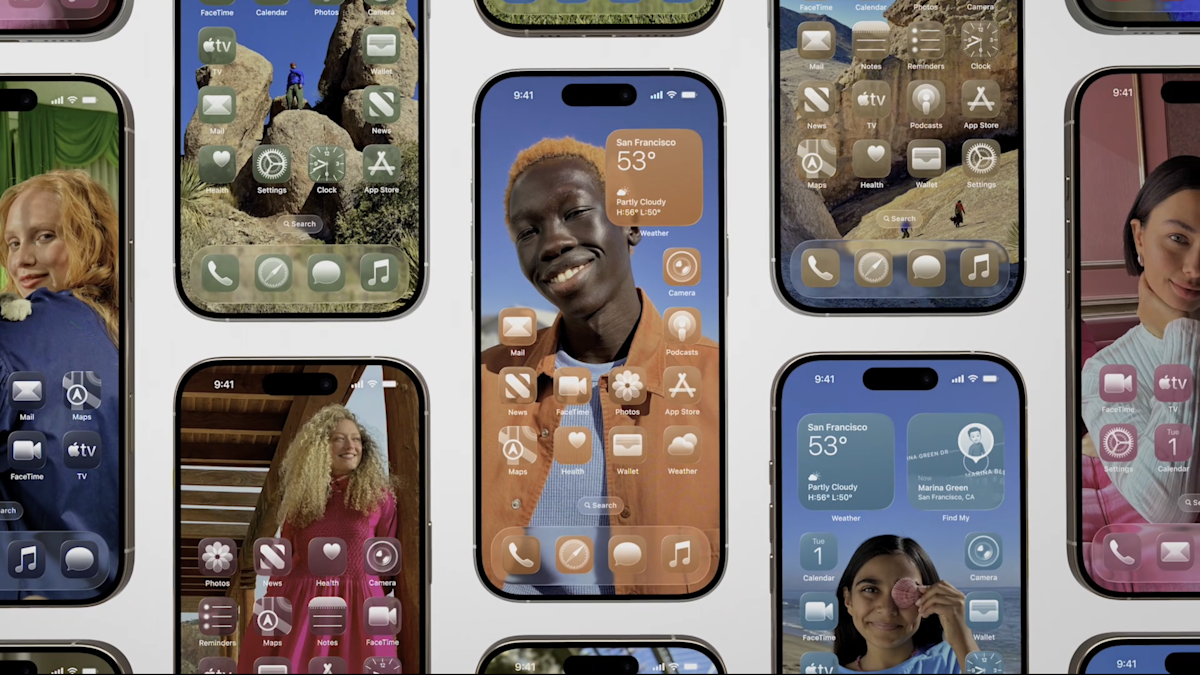
Liquid Glass Overview: Introduced at WWDC 2025, Liquid Glass features a translucent visual style that mimics glass, leading to mixed reactions due to legibility issues and animation lag.
-
New Options for Users: Users can choose between “Clear,” which maintains the original design, and “Tinted,” which enhances opacity and contrast for better readability.
-
Customization Trend: This update reflects Apple’s broader strategy to enhance system customizability, alongside other recent features like Spatial Scenes.
Apple’s recent release of iOS 26.1 introduces a highly anticipated update for iPhone users. This update streamlines the notorious Liquid Glass effect—a design choice that received mixed reviews. Users, unhappy with its translucency, found it challenging to read and often straining to the eyes. Apple responded by including a new Liquid Glass toggle that allows for customization.
To access this feature, ensure your iPhone runs on iOS 26.1. First, check your version by going to Settings, then General, and selecting Software Update. If you’re all set, return to Settings and navigate to Display & Brightness. Here, the new Liquid Glass option gives you two settings: “Clear” or “Tinted.”
The Clear option features Apple’s original concept, highlighting see-through controls. In contrast, the Tinted setting enhances opacity and increases contrast for better legibility. Users can preview both options before making a choice, allowing for a tailored experience.
This new toggle follows feedback from beta testers who enjoyed an early frosted look. Although the feature lacks an opacity slider, Apple appears committed to improving personalization within its ecosystem. The shift toward more customizable interfaces marks a significant step forward, benefiting users by addressing their needs and preferences.
This update not only enhances usability but also encourages a more enjoyable interaction with technology. As smart cities and urban innovation continue to evolve, features like these foster a more user-friendly environment, showcasing how technology adapts to serve its community better.
Stay Ahead with the Latest Tech Trends
Explore the future of technology with our detailed insights on Artificial Intelligence.
Stay inspired by the vast knowledge available on Wikipedia.
GadgetsV1
