
Close Menu
    Facebook X (Twitter) Instagram
    Friday, July 17
    Top Stories:
    • 30 Days of Trust: Eric Migicovsky on Pebble’s Warranty Philosophy
    • HP Slapped with Millions in Fines for Cartel-Like Practices in Ink and PCs
    • Limited Edition Messi: Galaxy Z Fold 8 Ultra Launches Early!
    Facebook X (Twitter) Instagram Pinterest Vimeo
    IO Tribune
    • Home
    • AI
    • Tech
      • Gadgets
      • Fashion Tech
    • Crypto
    • Smart Cities
      • IOT
    • Science
      • Space
      • Quantum
    • OPED
    IO Tribune
    Home » Transform Your Phone into a Switch 2 Webcam!
    Gadgets

    Transform Your Phone into a Switch 2 Webcam!

    Lina Johnson MercilliBy Lina Johnson MercilliDecember 6, 2025No Comments2 Mins Read
    Share Facebook Twitter Pinterest LinkedIn Tumblr Reddit Telegram Email
    Share
    Facebook Twitter LinkedIn Pinterest Email

    Summary Points

    1. External Webcam Requirement: The Switch 2 lacks a built-in camera, necessitating an external one for video calls, but now Google Pixel users can utilize their phones instead.

    2. Direct Compatibility: Recent updates enable Google Pixel phones to function as external webcams for the Switch 2 without requiring third-party applications.

    3. Functionality Enhanced by Updates: The November Pixel Drop update introduced essential support that previously did not allow webcam functionality with the Switch 2.

    4. Confirmed Improvements: Testing indicates successful operation after the November update, which included a fix for prior connectivity issues with webcam mode.

    You Can Now Use Your Phone as a Switch 2 Webcam

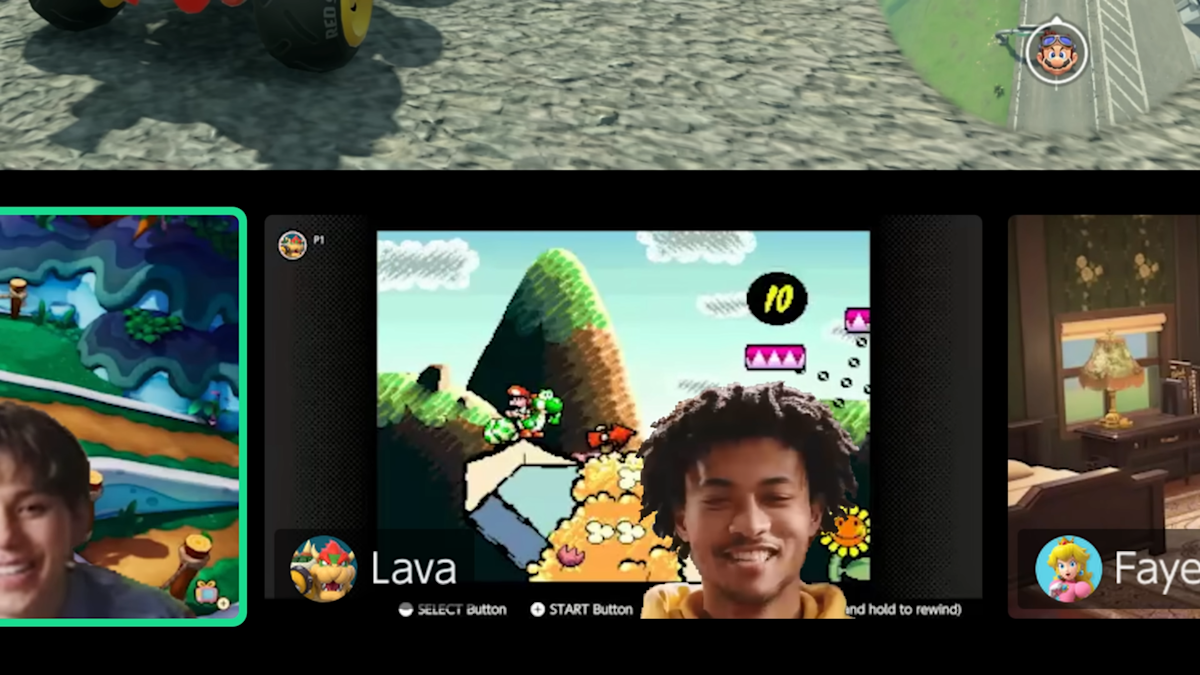
    Exciting news for gamers and video callers alike! The Nintendo Switch 2, which lacks a built-in camera, has found a convenient solution. You can now use your Google Pixel as a webcam for GameChat video calls. This advancement eliminates the need for external cameras, making it easier to connect with friends.

    Android Authority reported this development last Friday. Now, if you own a Pixel phone, you can seamlessly integrate it with your Switch 2. Interestingly, Google introduced the capability for Android devices to act as external webcams about two years ago. This feature became part of the Android 14 update, utilizing USB Video Class mode (UVC).

    However, it wasn’t until November’s firmware update that the functionality worked perfectly with the Switch 2. Before this update, users encountered issues connecting their Pixel phones. After installing the November update, the webcam feature came to life, providing a straightforward solution for gamers.

    Moreover, the November release notes highlighted a fix for webcam issues under certain conditions. This commitment to improvement reassures users that Google is focused on enhancing the gaming experience.

    As urban innovation continues to thrive, features like these reflect the growing intersection of technology and daily life. By enabling smartphones to serve multiple functions, it enriches communication and connectivity in modern cities. Gamers can now enjoy high-quality video calls while immersing themselves in their favorite games, reinforcing the value of adaptability in technology. Stay tuned for more updates as we await Google’s official confirmation on this feature.

    Discover More Technology Insights

    Stay informed on the revolutionary breakthroughs in Quantum Computing research.

    Access comprehensive resources on technology by visiting Wikipedia.

    GadgetsV1

    android Android Authority Android devices apple cell google Google Pixel iOS mobile The Switch VT1
    Share. Facebook Twitter Pinterest LinkedIn Tumblr Email
    Previous ArticleTop iPhone Picks for 2025: Which One to Buy?
    Next Article Analyst: MSTR Could Soar 45% with Bitcoin Breakout
    Avatar photo
    Lina Johnson Mercilli
    • Website

    Lina Johnson Marcelli is the editor for IO Tribune, bringing over two decades of experience in journalism to her role. With a BA in Journalism, she is passionate about delivering impactful stories that resonate with readers. Known for her keen editorial vision and leadership, Lina is dedicated to fostering innovative storytelling across the publication. Outside of work, she enjoys exploring new media trends and mentoring aspiring journalists.

    Related Posts

    Tech

    30 Days of Trust: Eric Migicovsky on Pebble’s Warranty Philosophy

    July 17, 2026
    Space

    Catch the Celestial Show: Why You Can’t Miss This Week’s Meteor Shower!

    July 17, 2026
    Tech

    HP Slapped with Millions in Fines for Cartel-Like Practices in Ink and PCs

    July 17, 2026
    Add A Comment

    Comments are closed.

    Must Read

    30 Days of Trust: Eric Migicovsky on Pebble’s Warranty Philosophy

    July 17, 2026

    Catch the Celestial Show: Why You Can’t Miss This Week’s Meteor Shower!

    July 17, 2026

    HP Slapped with Millions in Fines for Cartel-Like Practices in Ink and PCs

    July 17, 2026

    San Francisco Urges Removal of Nudify AI Apps

    July 17, 2026

    Samsung Galaxy Z Flip 8 & Z Fold 8: Camera & Battery Insights

    July 17, 2026
    Categories
    • AI
    • Crypto
    • Fashion Tech
    • Gadgets
    • IOT
    • OPED
    • Quantum
    • Science
    • Smart Cities
    • Space
    • Tech
    Most Popular

    I Hidden a Tiny Computer Inside a Transformer!

    April 14, 2026

    Human Touch: Key to AI and Computing

    June 8, 2026

    India Temporarily Bans Telegram Amid Exam Fraud Crackdown

    June 17, 2026
    Our Picks

    Fortnite Returns to App Store Worldwide After Year-Long Hiatus

    May 20, 2026

    Beyond the Stars: The Artemis II Crew’s Cutting-Edge Suits

    March 28, 2026

    Stripe’s First Employee Acquires a Bank: A Fintech Visionary’s Next Move

    July 3, 2025
    Categories
    • AI
    • Crypto
    • Fashion Tech
    • Gadgets
    • IOT
    • OPED
    • Quantum
    • Science
    • Smart Cities
    • Space
    • Tech
    • Privacy Policy
    • Disclaimer
    • Terms and Conditions
    • About Us
    • Contact us
    Copyright © 2025 Iotribune.comAll Rights Reserved.

    Type above and press Enter to search. Press Esc to cancel.