
Close Menu
    Facebook X (Twitter) Instagram
    Monday, March 9
    Top Stories:
    • ZTE’s Computing Revenue Soars 150% Amid AI Boom, Profits Drop 33%
    • AI & Smartphones Stalled: Middle East Crisis Shakes MWC 2026
    • Revolutionary Bacterial Kill Switch Could Transform Superbug Warfare
    Facebook X (Twitter) Instagram Pinterest Vimeo
    IO Tribune
    • Home
    • AI
    • Tech
      • Gadgets
      • Fashion Tech
    • Crypto
    • Smart Cities
      • IOT
    • Science
      • Space
      • Quantum
    • OPED
    IO Tribune
    Home » Game-Changer: Spotify’s Exclusive Android Feature!
    Gadgets

    Game-Changer: Spotify’s Exclusive Android Feature!

    Lina Johnson MercilliBy Lina Johnson MercilliDecember 16, 2025No Comments2 Mins Read
    Share Facebook Twitter Pinterest LinkedIn Tumblr Reddit Telegram Email
    Share
    Facebook Twitter LinkedIn Pinterest Email

    Essential Insights

    1. Exclusive Feature: Spotify’s app shortcuts on Android allow users to create unlimited home screen icons for specific artists or playlists, a functionality not available on iOS due to different operating system capabilities.

    2. Quick Access: By starting playback of a song from an artist or playlist, users can easily create shortcuts to bypass Spotify’s algorithmic widgets and navigate directly to their favorite music.

    3. Customization: These Android shortcuts can adopt themed icons, matching the overall aesthetic of the user’s home screen, enhancing personalization and ease of access.

    4. Limited iOS Option: While iOS has a similar feature, it lacks the flexibility and customization options of Android’s App Shortcuts, making the process more tedious and less convenient for iPhone users.

    Spotify’s Game-Changing Feature: Android-Only App Shortcuts

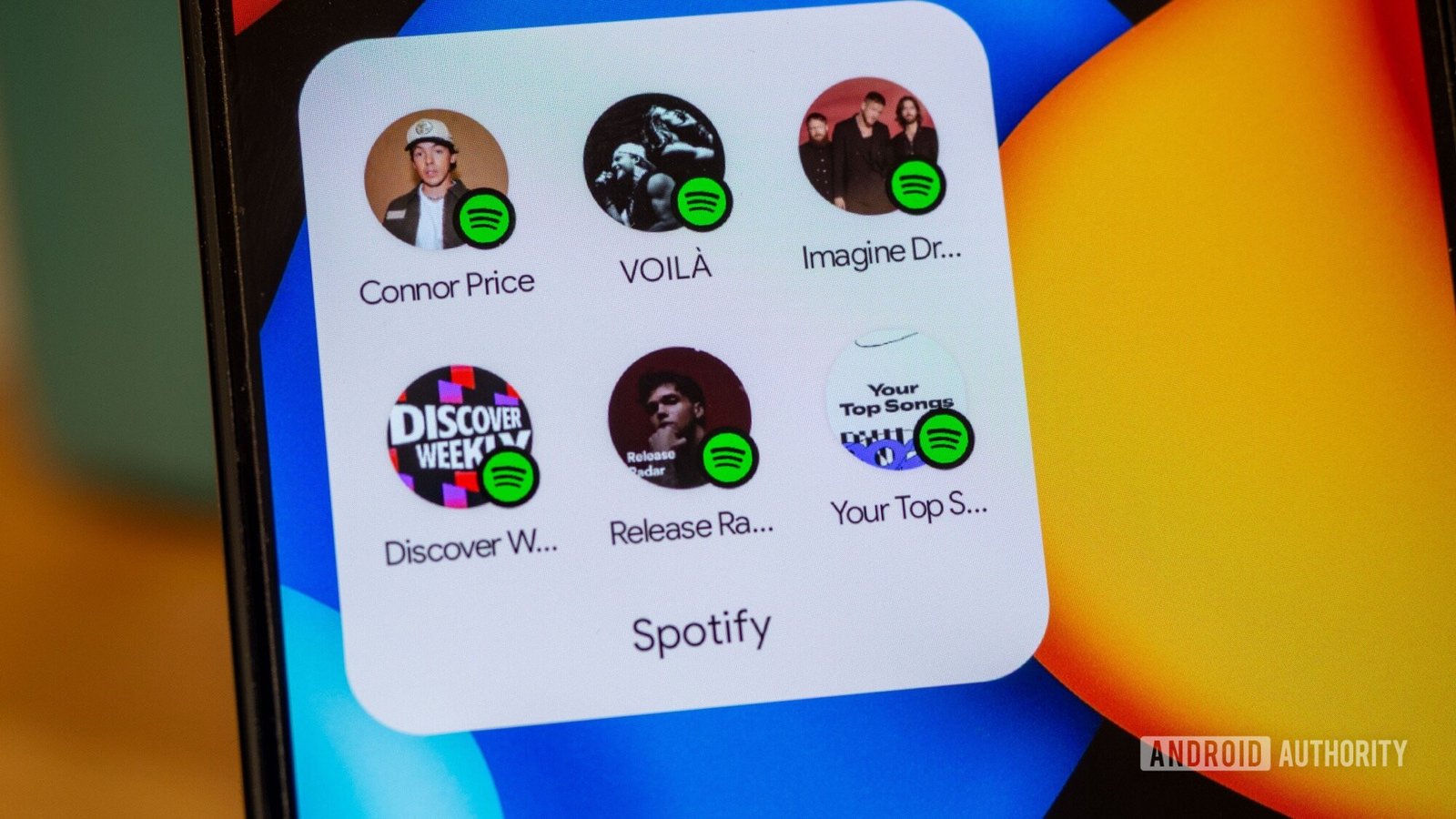
    Spotify has rolled out a game-changing feature exclusive to Android users: App Shortcuts. This functionality allows fans to create unlimited home screen shortcuts for any artist or playlist—something iOS cannot replicate.

    To create a shortcut, start by playing any song from the desired artist or playlist. Then, exit the Spotify app and long-press the Spotify icon on your home screen. You’ll see a new option for the specific music you just played. Drag this option to your home screen, and voilà! You have direct access to your favorite music in just one tap.

    This feature caters to users tired of navigating Spotify’s crowded algorithmic widgets and confusing libraries. With shortcuts, you can bypass all that clutter. Instead of scrolling through recommendations, you get immediate access to what you truly want to play.

    An additional perk exists for those using Android 16 QPR2. By enabling the Themed icons option, your shortcuts will automatically match your home screen’s design, making it visually appealing.

    Why is this unique to Android? The App Shortcuts API from Google enables this customization. While iOS offers a similar Quick Actions feature, it doesn’t support unique artist or playlist icons. Instead, iOS limits options to a few recently played entries, lacking the flexibility that makes Android stand out.

    This innovative feature not only enhances user experience on Spotify but also underscores the growing capabilities of Android. For those who love their music, this is a win worth celebrating.

    Expand Your Tech Knowledge

    Dive deeper into the world of Cryptocurrency and its impact on global finance.

    Discover archived knowledge and digital history on the Internet Archive.

    GadgetsV1

    android Android apps apple cell google iOS mobile Spotify VT1
    Share. Facebook Twitter Pinterest LinkedIn Tumblr Email
    Previous ArticleIs Bitcoin Set for One Last Drop Before a Rally?
    Next Article Conquering Battery Anxiety: My Lifesaver Power Bank
    Avatar photo
    Lina Johnson Mercilli
    • Website

    Lina Johnson Marcelli is the editor for IO Tribune, bringing over two decades of experience in journalism to her role. With a BA in Journalism, she is passionate about delivering impactful stories that resonate with readers. Known for her keen editorial vision and leadership, Lina is dedicated to fostering innovative storytelling across the publication. Outside of work, she enjoys exploring new media trends and mentoring aspiring journalists.

    Related Posts

    IOT

    Top Family Phone Plans to Watch in 2026

    March 8, 2026
    Science

    Creating Your Digital Twin: Revolutionizing Personalized Surgery

    March 8, 2026
    Crypto

    CryptoQuant Declares the Most Transparent Reserve Exchange

    March 8, 2026
    Add A Comment

    Comments are closed.

    Must Read

    Top Family Phone Plans to Watch in 2026

    March 8, 2026

    Creating Your Digital Twin: Revolutionizing Personalized Surgery

    March 8, 2026

    CryptoQuant Declares the Most Transparent Reserve Exchange

    March 8, 2026

    First-Ever Half-Möbius Molecule Unveiled

    March 8, 2026

    Behind the Black Box: How AI Explains Itself

    March 8, 2026
    Categories
    • AI
    • Crypto
    • Fashion Tech
    • Gadgets
    • IOT
    • OPED
    • Quantum
    • Science
    • Smart Cities
    • Space
    • Tech
    • Technology
    Most Popular

    Crypto Crimes Plummet: Just $76M Lost in December 2025

    January 4, 2026

    Reaching for the Stars: Communication Innovation Breaks New Ground

    September 20, 2025

    Binance Dismisses Sanctions Evasion Claims Amid 97% Decline

    February 24, 2026
    Our Picks

    Meet Your New Battery Champion: OnePlus Launching January 8!

    December 30, 2025

    Skyward Innovation: Pioneering the Future of Flight in 2025

    December 24, 2025

    Unveiling the Future: Waymo’s Co-CEO on Autonomous Vehicles at Disrupt 2025

    September 16, 2025
    Categories
    • AI
    • Crypto
    • Fashion Tech
    • Gadgets
    • IOT
    • OPED
    • Quantum
    • Science
    • Smart Cities
    • Space
    • Tech
    • Technology
    • Privacy Policy
    • Disclaimer
    • Terms and Conditions
    • About Us
    • Contact us
    Copyright © 2025 Iotribune.comAll Rights Reserved.

    Type above and press Enter to search. Press Esc to cancel.