
Close Menu
    Facebook X (Twitter) Instagram
    Sunday, June 14
    Top Stories:
    • Parrots: The Surprise of Naming in the Animal Kingdom!
    • Millipedes: Earth’s Original Land Conquerors
    • Huawei’s ‘Chip Queen’ Returns: Leading Innovation Amid Scaling Law
    Facebook X (Twitter) Instagram Pinterest Vimeo
    IO Tribune
    • Home
    • AI
    • Tech
      • Gadgets
      • Fashion Tech
    • Crypto
    • Smart Cities
      • IOT
    • Science
      • Space
      • Quantum
    • OPED
    IO Tribune
    Home » Google Set to Reverse Controversial Quick Settings Change
    Gadgets

    Google Set to Reverse Controversial Quick Settings Change

    Lina Johnson MercilliBy Lina Johnson MercilliDecember 21, 2025No Comments3 Mins Read
    Share Facebook Twitter Pinterest LinkedIn Tumblr Reddit Telegram Email
    Share
    Facebook Twitter LinkedIn Pinterest Email

    Essential Insights

    1. User Feedback & Controversy: With Android 12, Google replaced individual Wi-Fi and mobile data toggles with a combined Internet tile, leading to user complaints about increased inconvenience.

    2. Rationale for Change: Google explained the change aimed to simplify network management and prevent excessive mobile data use, as users often forgot to reactivate Wi-Fi after switching to mobile data.

    3. Potential Reversal: New evidence from Android 16 suggests Google may split the Internet tile back into separate Wi-Fi and mobile data toggles, responding to ongoing user dissatisfaction.

    4. Uncertain Future: Although the changes are hinted in recent code updates, it’s unclear when they will be fully implemented or if they will be available for all users, beyond OEM partners.

    Google May Revert Controversial Quick Settings Change

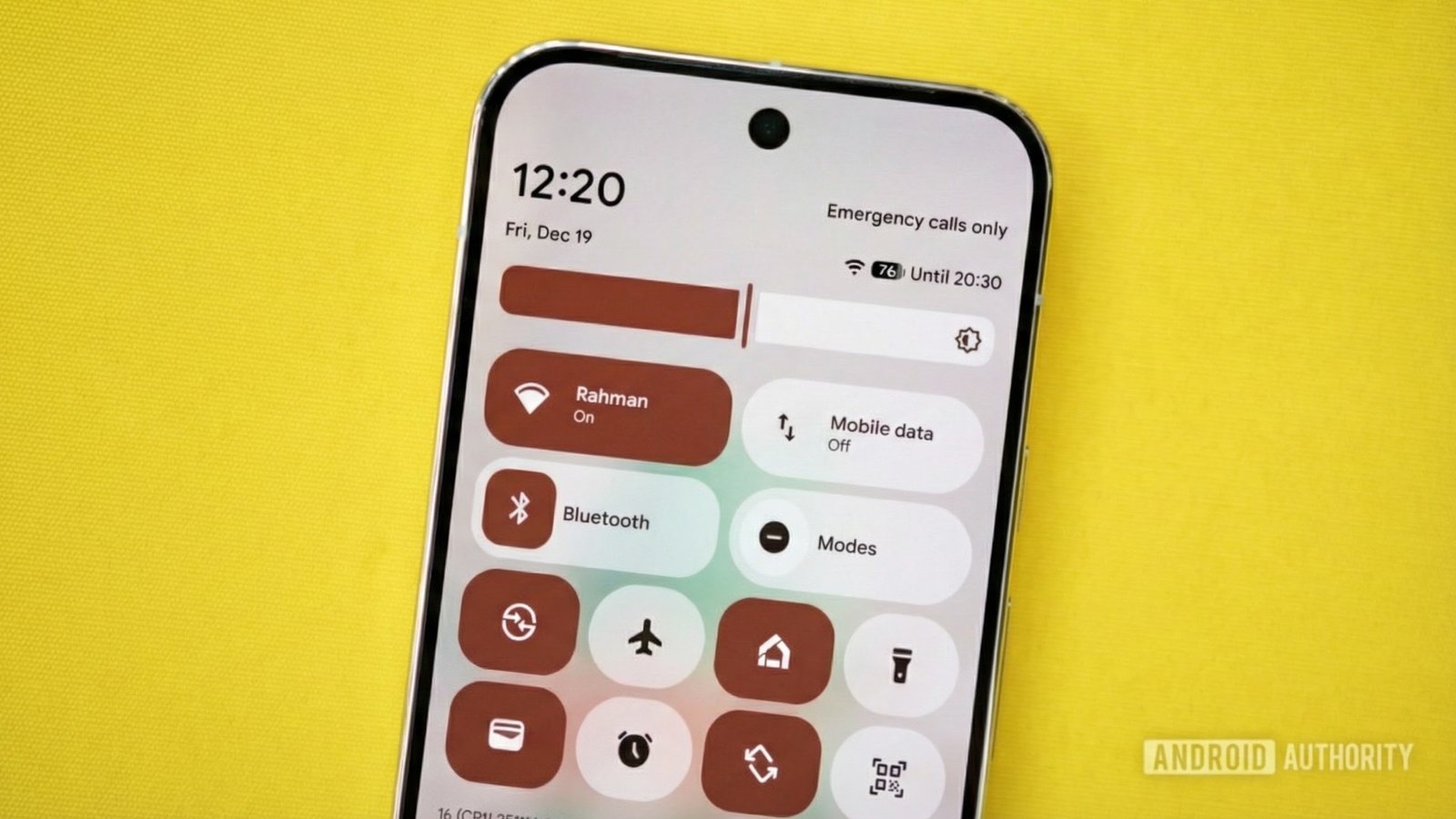
    Google might be ready to change its approach to Quick Settings with the upcoming Android 16 update. When Android 12 launched in 2021, Google replaced individual toggles for Wi-Fi and mobile data with a combined “Internet” tile. Initially, this aimed to simplify navigation. However, many users found it cumbersome.

    Previously, users could easily toggle connections by simply tapping. Now, they must expand the Internet tile to access these settings, adding an extra step. This shift frustrated power users, who preferred the convenience of the old system. Google’s intent was to help users better manage their data usage, but the response was mixed.

    Recently, clues have emerged indicating a possible reversal. Developers discovered code suggesting that Google plans to separate the Internet tile back into distinct Wi-Fi and mobile data toggles. Evidence within the Android Open Source Project points to this change, with new code referring to a mobile data tile and an updated Wi-Fi tile.

    While this change is still under development, it hints at a brighter future for Quick Settings. If implemented, users could regain the simplicity that many have missed. Keeping an eye on future Android updates will be essential, as Google navigates user feedback and strives to enhance the experience for all.

    As urban innovation continues to shape our daily lives, having hassle-free technology aligns perfectly with the emergence of smart cities. Efficient interfaces empower citizens to utilize mobile technology effectively. Google’s potential reversion to a more straightforward Quick Settings feature could offer enhanced connectivity, making life easier in increasingly digital urban environments.

    Discover More Technology Insights

    Explore the future of technology with our detailed insights on Artificial Intelligence.

    Stay inspired by the vast knowledge available on Wikipedia.

    GadgetsV1

    android Android 17 apple cell google iOS mobile VT1
    Share. Facebook Twitter Pinterest LinkedIn Tumblr Email
    Previous ArticleCrystal-Cannonball Wonders: The Enigmatic Dinosaur Eggs
    Next Article Trillions in Assets, Millions Thriving
    Avatar photo
    Lina Johnson Mercilli
    • Website

    Lina Johnson Marcelli is the editor for IO Tribune, bringing over two decades of experience in journalism to her role. With a BA in Journalism, she is passionate about delivering impactful stories that resonate with readers. Known for her keen editorial vision and leadership, Lina is dedicated to fostering innovative storytelling across the publication. Outside of work, she enjoys exploring new media trends and mentoring aspiring journalists.

    Related Posts

    Crypto

    Bybit Reveals Why BTC Dropped Below $60K

    June 14, 2026
    AI

    Essential 4 Lines to Master Your Claude Skill

    June 14, 2026
    Space

    Unlocking Cosmic Secrets: The Enigmatic Black Eye Galaxy

    June 14, 2026
    Add A Comment

    Comments are closed.

    Must Read

    Bybit Reveals Why BTC Dropped Below $60K

    June 14, 2026

    Essential 4 Lines to Master Your Claude Skill

    June 14, 2026

    Unlocking Cosmic Secrets: The Enigmatic Black Eye Galaxy

    June 14, 2026

    Ultimate Biometric Smart Lock: SwitchBot Lock Vision Pro Review

    June 14, 2026

    Vision LLMs: Unlocking PDF Charts & Diagrams

    June 14, 2026
    Categories
    • AI
    • Crypto
    • Fashion Tech
    • Gadgets
    • IOT
    • OPED
    • Quantum
    • Science
    • Smart Cities
    • Space
    • Tech
    • Technology
    Most Popular

    Frog Love: How Noise Shapes Mating Choices

    September 13, 2025

    Stylish Fitness: Fitbit Air & Wristwatch Combo Surprises

    June 5, 2026

    Active Supply Surges as Price Volatility Dips

    February 20, 2026
    Our Picks

    Breaking Free: Escaping the Ambition Trap

    April 15, 2026

    I Tried Making my Own (Bad) LLM Benchmark to Cheat in Escape Rooms

    February 10, 2025

    Water Wise: Nature’s Ingenious Plant Adaptations

    August 3, 2025
    Categories
    • AI
    • Crypto
    • Fashion Tech
    • Gadgets
    • IOT
    • OPED
    • Quantum
    • Science
    • Smart Cities
    • Space
    • Tech
    • Technology
    • Privacy Policy
    • Disclaimer
    • Terms and Conditions
    • About Us
    • Contact us
    Copyright © 2025 Iotribune.comAll Rights Reserved.

    Type above and press Enter to search. Press Esc to cancel.