
Close Menu
    Facebook X (Twitter) Instagram
    Monday, March 9
    Top Stories:
    • ZTE’s Computing Revenue Soars 150% Amid AI Boom, Profits Drop 33%
    • AI & Smartphones Stalled: Middle East Crisis Shakes MWC 2026
    • Revolutionary Bacterial Kill Switch Could Transform Superbug Warfare
    Facebook X (Twitter) Instagram Pinterest Vimeo
    IO Tribune
    • Home
    • AI
    • Tech
      • Gadgets
      • Fashion Tech
    • Crypto
    • Smart Cities
      • IOT
    • Science
      • Space
      • Quantum
    • OPED
    IO Tribune
    Home » Revamped Widget Resizing in Android 16 QPR3 Beta 2!
    Gadgets

    Revamped Widget Resizing in Android 16 QPR3 Beta 2!

    Lina Johnson MercilliBy Lina Johnson MercilliJanuary 18, 2026No Comments2 Mins Read
    Share Facebook Twitter Pinterest LinkedIn Tumblr Reddit Telegram Email
    Share
    Facebook Twitter LinkedIn Pinterest Email

    Summary Points

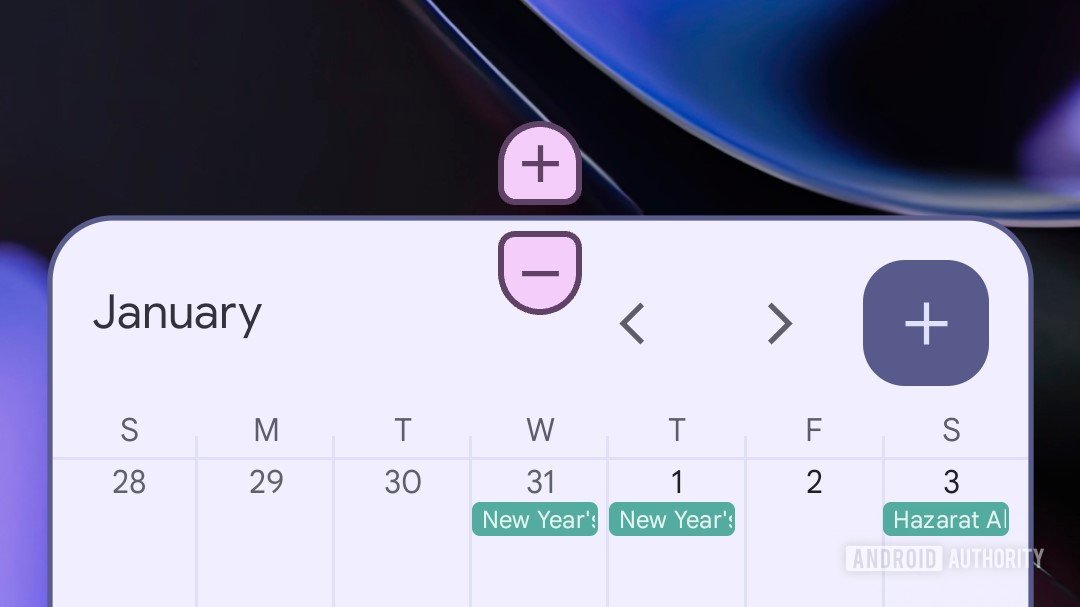
    1. New Resizing Feature: Android 16 QPR3 Beta 2 introduces plus and minus buttons for resizing home screen widgets, enhancing user experience beyond just dragging edges.

    2. Accessibility Focus: This new interface improves accessibility by allowing users with fine motor difficulties to resize widgets easily with taps instead of precise dragging.

    3. Visual Feedback: The buttons provide clear visual feedback by disappearing when maximum widget sizes are reached, helping users understand size limitations.

    4. Theming Compatibility: Resizing buttons adopt colors from the system theme, aligning with aesthetic preferences despite some initial design quirks.

    Android 16 QPR3 Beta 2 Introduces New Widget Resizing Feature

    This week, Google rolled out Android 16 QPR3 Beta 2, bringing significant enhancements to home screen widgets. Users now have an easier way to resize widgets with new plus and minus buttons. This improvement simplifies the resizing process beyond the traditional method of dragging edges.

    Previously, adjusting a widget’s size required precision, which might pose challenges for some users. However, the new interface allows for a more straightforward adjustment with just a few taps. This change promotes accessibility, especially for individuals with fine motor difficulties.

    Moreover, the new buttons clearly indicate when users reach the maximum or minimum widget size. This visual cue enhances the user experience and prevents frustration when resizing.

    The buttons also blend seamlessly with the Android system theme, showcasing colors that match user preferences. While some users may find the design unfamiliar at first, the cohesive look adds to the aesthetic appeal of the interface.

    As always with beta features, changes may occur before the final version is released. Google will continue to refine these controls, and users eagerly await further developments.

    Overall, this addition makes Android widgets more user-friendly, paving the way for a more customizable and vibrant home screen experience.

    Stay Ahead with the Latest Tech Trends

    Dive deeper into the world of Cryptocurrency and its impact on global finance.

    Discover archived knowledge and digital history on the Internet Archive.

    GadgetsV1

    android Android 16 apple cell google iOS mobile VT1 Widgets
    Share. Facebook Twitter Pinterest LinkedIn Tumblr Email
    Previous ArticleNature’s Eavesdroppers: Insects Tune into Plant Conversations
    Next Article Ethereum Price Alert: ETH Hits Key Roadblock on Path to $4K!
    Avatar photo
    Lina Johnson Mercilli
    • Website

    Lina Johnson Marcelli is the editor for IO Tribune, bringing over two decades of experience in journalism to her role. With a BA in Journalism, she is passionate about delivering impactful stories that resonate with readers. Known for her keen editorial vision and leadership, Lina is dedicated to fostering innovative storytelling across the publication. Outside of work, she enjoys exploring new media trends and mentoring aspiring journalists.

    Related Posts

    IOT

    Top Family Phone Plans to Watch in 2026

    March 8, 2026
    Science

    Creating Your Digital Twin: Revolutionizing Personalized Surgery

    March 8, 2026
    Crypto

    CryptoQuant Declares the Most Transparent Reserve Exchange

    March 8, 2026
    Add A Comment

    Comments are closed.

    Must Read

    Top Family Phone Plans to Watch in 2026

    March 8, 2026

    Creating Your Digital Twin: Revolutionizing Personalized Surgery

    March 8, 2026

    CryptoQuant Declares the Most Transparent Reserve Exchange

    March 8, 2026

    First-Ever Half-Möbius Molecule Unveiled

    March 8, 2026

    Behind the Black Box: How AI Explains Itself

    March 8, 2026
    Categories
    • AI
    • Crypto
    • Fashion Tech
    • Gadgets
    • IOT
    • OPED
    • Quantum
    • Science
    • Smart Cities
    • Space
    • Tech
    • Technology
    Most Popular

    Top AirPods to Elevate Your 2025 Listening Experience

    September 17, 2025

    Apple’s Game-Changer: Apps Can Now Redirect for Payments!

    May 2, 2025

    Waymo and Toyota: Driving Toward a Future of Autonomous Innovation

    April 30, 2025
    Our Picks

    DeepSeek’s Budget-Friendly A.I. Breakthrough

    February 12, 2025

    Google Update Sparks Brightness Bug for Some Pixels

    March 7, 2025

    Bitcoin Soars $10K from $81K Low, But December’s Bearish Trends Loom: Weekly Crypto Recap

    November 28, 2025
    Categories
    • AI
    • Crypto
    • Fashion Tech
    • Gadgets
    • IOT
    • OPED
    • Quantum
    • Science
    • Smart Cities
    • Space
    • Tech
    • Technology
    • Privacy Policy
    • Disclaimer
    • Terms and Conditions
    • About Us
    • Contact us
    Copyright © 2025 Iotribune.comAll Rights Reserved.

    Type above and press Enter to search. Press Esc to cancel.