

Fast Facts
-
Google’s Find Hub, combined with Gemini and Google Assistant, allows users to locate important documents and belongings without requiring compatible tags.
-
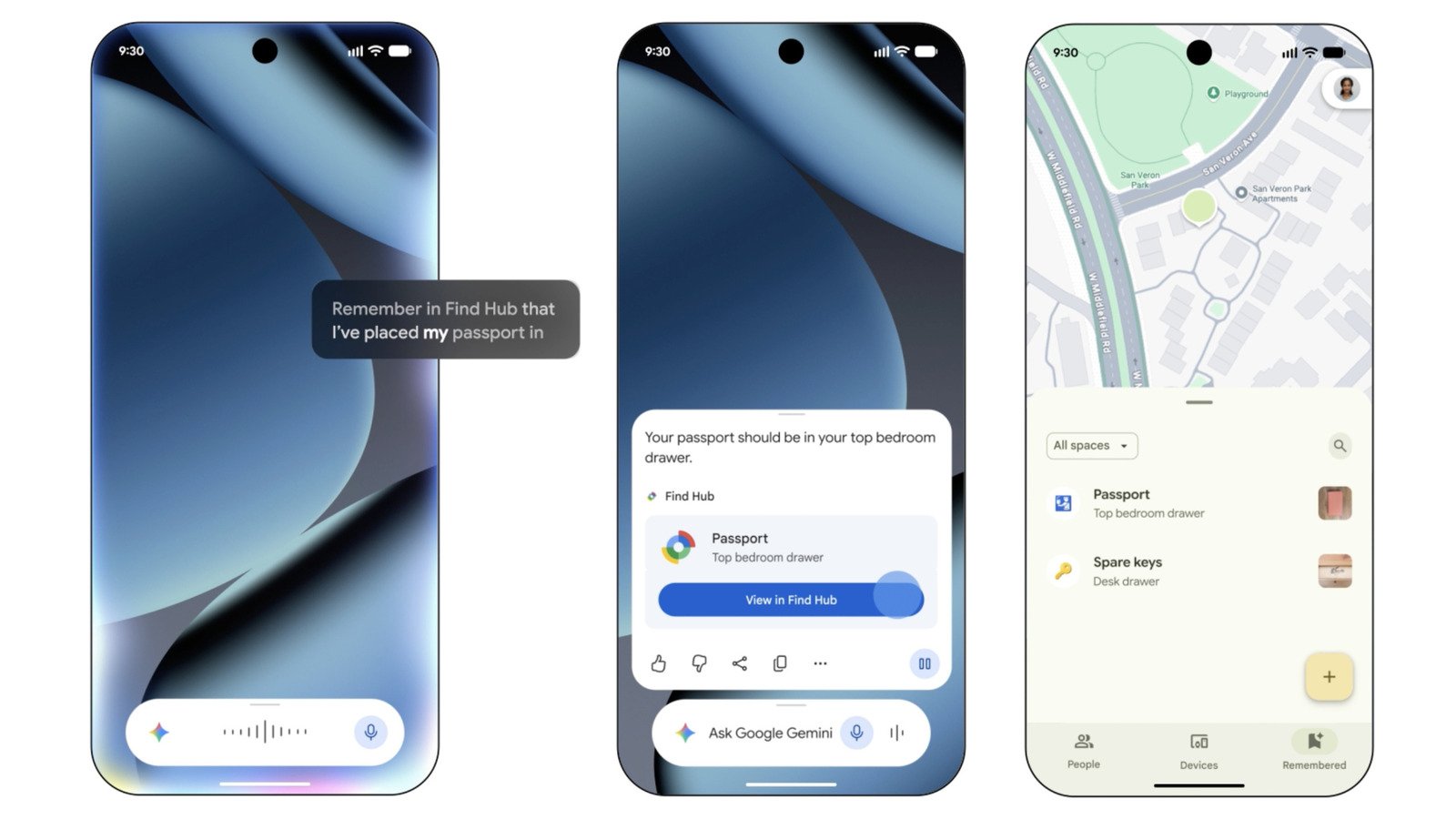
Users can enable Find Hub via settings, set Gemini as their default assistant, and then use voice commands like “remember I kept my passport in the vault” to save item locations seamlessly.
-
Saved locations can include photos, specific addresses, and notes, which can be manually added or automatically recorded through voice commands, making tracking detailed and flexible.
-
When needed, users can ask Gemini, “Where did I keep my passport?” to get the latest location info, or directly browse the Find Hub app’s Remembered tab for detailed records.
How Gemini and Find Hub Make Tracking Easy
These days, keeping track of important documents is more important than ever. Fortunately, new tools like Gemini and Find Hub can help. You don’t need to attach special tags to every item, which makes things simpler. Instead, you can use your phone’s smart features to remember where you stored key papers, such as passports or birth certificates. First, make sure Find Hub is turned on in your device settings. Then, set Gemini as your default digital helper through the Google app. Once set up, you can tell Gemini to remember the location of your documents. For example, say, “Hey Google, remember I put my passport in the vault.” Gemini quickly records the place, linking it to Find Hub. You can even add photos, multiple addresses, and notes for better recall. Also, if you prefer, you can manually enter details into Find Hub using the app’s “Remembered” tab. These simple steps make it easier to locate your vital papers when needed.
Using Voice Commands to Find Your Important Files
After saving your documents’ locations, you only need a quick voice command to find them again. Just ask Gemini, “Hey Google, where is my passport?” or “Where did I keep my birth certificate?” It then responds with the latest known location and provides a link to view details in Find Hub. This process saves time and reduces stress when hunting for essential papers. Additionally, you can open the Find Hub app anytime to see all your saved items. Each entry includes photos, addresses, or notes you’ve added. If you have multiple homes or storage spots, this feature helps you keep everything organized. It’s an effective way to maintain peace of mind, knowing your important documents are always within reach and easy to find.
Enhancements, Benefits, and Practical Value
The combination of Gemini and Find Hub introduces notable improvements to everyday organization. These tools automate the process of remembering where items are stored, reducing reliance on memory alone. They also allow you to document details with photos and notes, which can be invaluable in emergencies. For example, if a family member needs a specific document, you can quickly locate it with minimal fuss. Plus, since you don’t always need a special tag, it lowers the cost and complexity of tracking your belongings. On the other hand, some users might prefer traditional tagging or manual cataloging for added security. Nonetheless, this feature offers a practical and accessible solution for most people. It demonstrates how technology continues to simplify our lives by turning simple commands into powerful organizational tools. Overall, Gemini and Find Hub add significant value by making important items more manageable and easier to find.
Continue Your Tech Journey
Stay informed on the revolutionary breakthroughs in Quantum Computing research.
Explore past and present digital transformations on the Internet Archive.
CellphonesV1
