

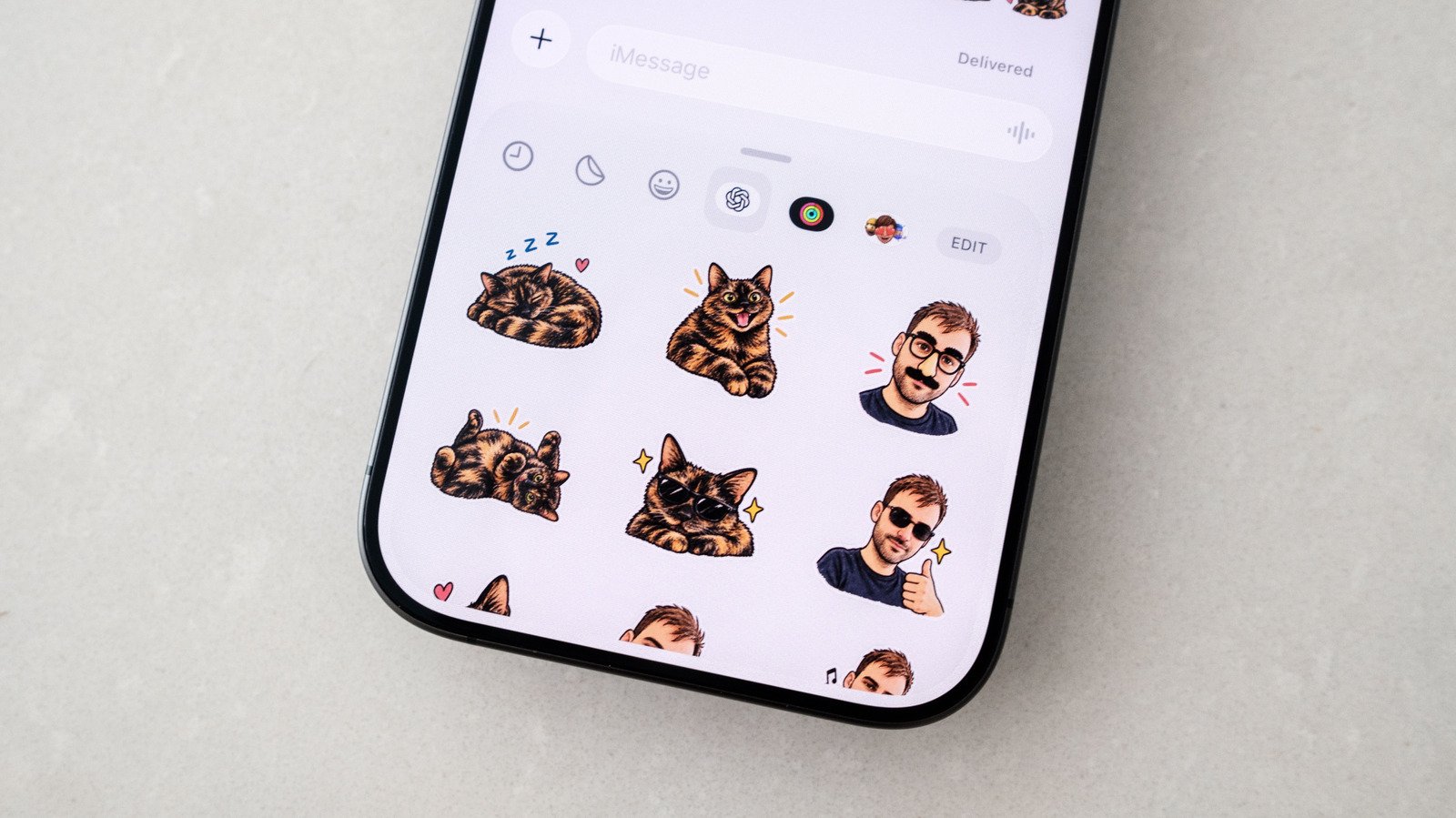
Quick Takeaways
- OpenAI’s ChatGPT Images now enables users to easily create personalized stickers from photos for iMessage and WhatsApp, making communication more expressive.
- The process involves selecting styles, reference images, or emojis via the mobile app to generate a set of nine stickers quickly.
- Users can refine or customize stickers through simple edits or prompts, ensuring the output matches their preferences.
- Sending stickers is straightforward within messaging apps, but generated stickers count towards ChatGPT usage limits, especially on free plans.
Creating Custom Stickers with ChatGPT is Easy and Fun
Many people love using stickers to show emotions. Unlike plain emojis, stickers add personality and warmth to your messages. Now, with ChatGPT’s new features, making your own stickers has become simpler. You just need to use the ChatGPT app on your phone. The process is straightforward, even if you’re new to it. First, open the app on your iOS or Android device. Then, tap the menu icon in the corner to reveal the sidebar. From there, choose ‘Images,’ and look for the ‘Trending’ section. Tap on ‘Stickers’ to see different options.
Next, pick a style you like or upload a photo or images you want to turn into stickers. You can also add some emoji to guide ChatGPT. After you make your selection, wait a moment. The app will generate nine stickers based on your input. If you like the results, tap ‘Add to chat apps’ and then choose either iMessage or WhatsApp. Note that iMessage only works on Apple devices, while WhatsApp can be used on any phone.
If the stickers don’t look quite right, don’t worry. You can ask ChatGPT to tweak them. Tap on a sticker, choose ‘Edit,’ and describe what you want to change. You can prompt ChatGPT to make the stickers more faithful to your original photo or ideas. If it doesn’t get it right, simply tell it to try again. Using this method, you can craft stickers that truly express your style and mood.
Sharing Your Stickers is Quick and Easy
Once you have your favorite stickers ready, sending them takes just a few taps. Open your preferred messaging app, whether it’s iMessage or WhatsApp. For iMessage, start a new chat or open an existing conversation. Tap the Plus button, then select ‘Stickers.’ Look for the OpenAI logo at the top of the chat window. Tap it to see your custom sticker packs. Choose the sticker you want and send it just like you would with any other sticker. It’s a smooth process that adds a personal touch to your conversations.
For WhatsApp users, the process is even simpler. Open a chat, then tap the sticker icon located on the side of the text box. Sometimes, you might need to tap another sticker icon if options are grouped together. Find your sticker pack, tap on the one you want, and it will send instantly. All your created stickers are kept together under the name you gave the pack, making it easy to find and share them anytime. Keep in mind, every time you create new stickers with ChatGPT, it counts toward your daily usage limits. If you’re on a free plan, you might have to wait until your limit resets before creating more.
Enhancements and Considerations for Your Sticker-Making Experience
Using ChatGPT to generate stickers offers many advantages. It saves time because you don’t need to design or cut out images manually. Instead, the AI helps bring your ideas to life with minimal effort. Plus, you can customize stickers repeatedly. If you want a different style or a specific look, just ask ChatGPT to generate new ones. This makes your sticker collection personal and unique.
On the other hand, be aware that this tool isn’t perfect. Sometimes, AI-generated stickers may not match your expectations exactly. Fortunately, editing options are available to improve or modify your stickers. Also, keep in mind that creating many stickers can quickly use up your AI usage quota. For heavy users, this could mean waiting for limits to refresh. Despite these minor constraints, the ability to turn simple images into expressive stickers adds value. It allows for more personalized and creative conversations on both iMessage and WhatsApp.
Overall, integrating ChatGPT into your messaging routine unlocks new ways to communicate. Whether you want to add humor, sentiment, or just fun visuals, this tool makes it easier than ever. As technology evolves, expect even better features and options to help you stay connected in a fun and meaningful way.
Stay Ahead with the Latest Tech Trends
Dive deeper into the world of Cryptocurrency and its impact on global finance.
Discover archived knowledge and digital history on the Internet Archive.
CellphonesV1
