
Close Menu
    Facebook X (Twitter) Instagram
    Saturday, May 16
    Top Stories:
    • Alibaba and Tencent’s contrasting AI investment strategies Revealed
    • Genmab Withdraws Two Antibody Assets, Includes ProfoundBio ADC
    • Dai Dai: Shakira & Burna Boy Unite for World Cup Anthem!
    Facebook X (Twitter) Instagram Pinterest Vimeo
    IO Tribune
    • Home
    • AI
    • Tech
      • Gadgets
      • Fashion Tech
    • Crypto
    • Smart Cities
      • IOT
    • Science
      • Space
      • Quantum
    • OPED
    IO Tribune
    Home » Zoom in on Text with MacBook’s Magnifier
    Gadgets

    Zoom in on Text with MacBook’s Magnifier

    Lina Johnson MercilliBy Lina Johnson MercilliDecember 3, 2025No Comments3 Mins Read
    Share Facebook Twitter Pinterest LinkedIn Tumblr Reddit Telegram Email
    Share
    Facebook Twitter LinkedIn Pinterest Email

    Top Highlights

    1. New Accessibility Feature: Apple’s “Magnifier,” initially for iPhones, has been introduced to Mac, enhancing accessibility in educational and professional settings by allowing users to magnify and identify objects.

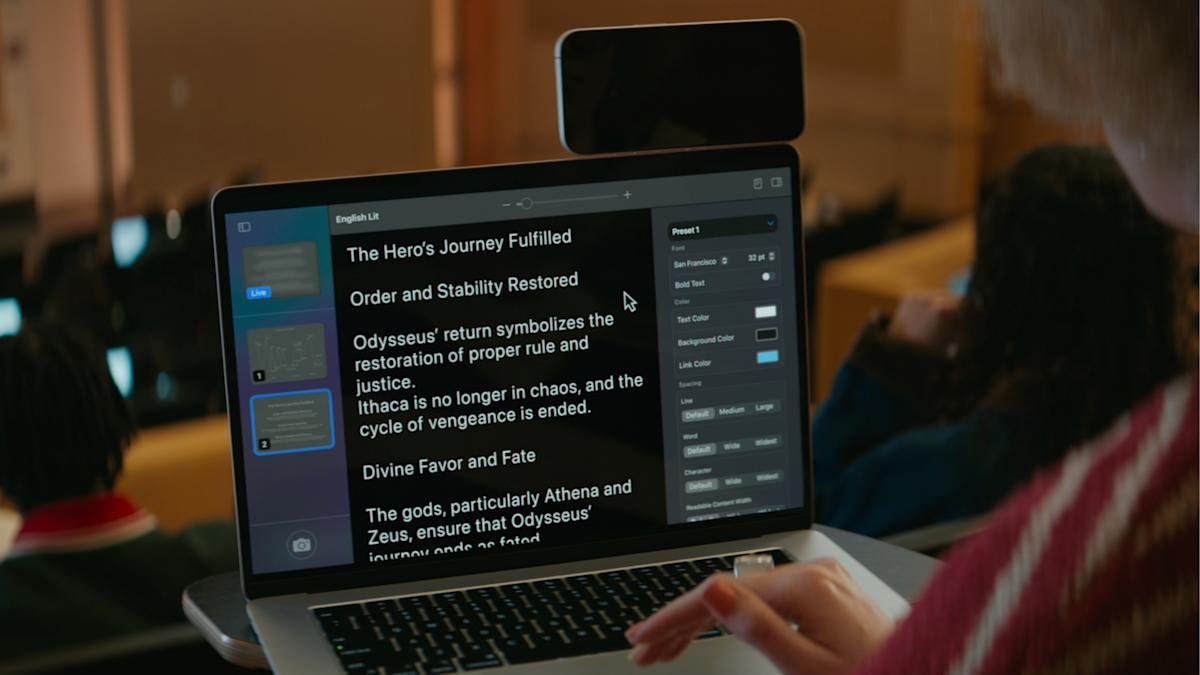
    2. Versatile Functionality: The Magnifier app can utilize built-in webcams, third-party cameras, or iPhones via Continuity to zoom in on distant text or documents, making it ideal for lecture halls or office environments.

    3. Enhanced Text Identification: The app’s machine learning capabilities enable users to identify, format, and read text from captured images in real-time while offering customization options for color and font.

    4. Self-Magnification Use: Magnifier can also zoom in on the user, making it useful for personal grooming tasks, while allowing photo capture for later review, enhancing everyday usability.

    Zooming In: Using Magnifier on Your MacBook

    Apple recently expanded its accessibility features by bringing the “Magnifier” tool to MacBooks. Originally designed for iPhone users, this feature enhances everyday experiences by allowing users to zoom in on distant text or objects. This addition makes a MacBook even more versatile, especially in settings like classrooms or offices.

    To use Magnifier, ensure your device runs macOS 26 Tahoe or later. The tool can connect to a built-in webcam, a third-party camera, or an iPhone through Apple’s Continuity feature. This flexibility allows you to zoom in on faraway text, such as a whiteboard in a lecture hall or printed documents.

    Getting started is simple. Open Magnifier and click on the Camera section in the menu bar. From there, select your preferred camera. Then, to view documents on your desk, choose the Desk View camera. Clicking the Reader icon enables you to format text for easy reading. Apple provides options to customize the appearance of the text, including color, font, and background.

    Additionally, Magnifier offers audio support. Users can listen to the identified text by clicking the Play button. You can navigate through the text using the Skip Forward and Skip Backward buttons. If you need to adjust the playback speed, click the 1x button for more options.

    Magnifier also serves as a handy tool for self-reflection. By default, it uses your MacBook’s webcam to provide a detailed view of your face. This feature is particularly useful for applying makeup or inserting contacts. Adjust the zoom using a sliding scale for a perfect view.

    In testing, the built-in webcam provided the best performance. If you face issues with a third-party camera, consider switching to the built-in option. You can easily switch cameras in the Magnifier app’s top menu bar.

    Overall, Magnifier enhances accessibility on MacBook while promoting user independence. Its versatility proves beneficial for many situations—whether in education, work, or daily activities. Embracing these smart tools fosters innovation in urban living. The Magnifier tool stands out as an example of how technology can effortlessly adapt to our needs.

    Expand Your Tech Knowledge

    Stay informed on the revolutionary breakthroughs in Quantum Computing research.

    Access comprehensive resources on technology by visiting Wikipedia.

    GadgetsV1

    android apple cell format text google iOS MacBook Magnifier Magnifier app mobile text text Magnifier VT1
    Share. Facebook Twitter Pinterest LinkedIn Tumblr Email
    Previous ArticleMSTR Stock at Record Discount: Bitcoin Holdings Overwhelm Value
    Next Article Unlocking Innovation: The Case for Galaxy S26 Edge
    Avatar photo
    Lina Johnson Mercilli
    • Website

    Lina Johnson Marcelli is the editor for IO Tribune, bringing over two decades of experience in journalism to her role. With a BA in Journalism, she is passionate about delivering impactful stories that resonate with readers. Known for her keen editorial vision and leadership, Lina is dedicated to fostering innovative storytelling across the publication. Outside of work, she enjoys exploring new media trends and mentoring aspiring journalists.

    Related Posts

    Crypto

    ZachXBT’s Bombshell Claims Crash LAB 30%+ in a Day

    May 16, 2026
    AI

    Mira Murati: AI Must Keep Humans Involved

    May 15, 2026
    Gadgets

    Marathon’s Future: Duo Queues, New PvE Modes & Improved Onboarding

    May 15, 2026
    Add A Comment

    Comments are closed.

    Must Read

    ZachXBT’s Bombshell Claims Crash LAB 30%+ in a Day

    May 16, 2026

    Mira Murati: AI Must Keep Humans Involved

    May 15, 2026

    Marathon’s Future: Duo Queues, New PvE Modes & Improved Onboarding

    May 15, 2026

    Alibaba and Tencent’s contrasting AI investment strategies Revealed

    May 15, 2026

    Genmab Withdraws Two Antibody Assets, Includes ProfoundBio ADC

    May 15, 2026
    Categories
    • AI
    • Crypto
    • Fashion Tech
    • Gadgets
    • IOT
    • OPED
    • Quantum
    • Science
    • Smart Cities
    • Space
    • Tech
    • Technology
    Most Popular

    Why I Can’t Ditch My Kindle: One Irresistible Feature

    August 31, 2025

    Charger Mania: Up to 50% Off This October!

    October 8, 2025

    Visa Expands Stablecoin Support with Stellar and Avalanche

    August 2, 2025
    Our Picks

    “Grab the Apple Watch SE 3 for Just $200 This Black Friday!”

    November 24, 2025

    Porsche Shuts Down E-Bike and Battery Units in Major Overhaul

    May 8, 2026

    Tron’s SunPump Soars Amid Meme Coin Surge

    February 17, 2025
    Categories
    • AI
    • Crypto
    • Fashion Tech
    • Gadgets
    • IOT
    • OPED
    • Quantum
    • Science
    • Smart Cities
    • Space
    • Tech
    • Technology
    • Privacy Policy
    • Disclaimer
    • Terms and Conditions
    • About Us
    • Contact us
    Copyright © 2025 Iotribune.comAll Rights Reserved.

    Type above and press Enter to search. Press Esc to cancel.