
Close Menu
    Facebook X (Twitter) Instagram
    Friday, February 6
    Top Stories:
    • Zuckerberg Rethinks Meta’s Approach to Social Issues Amid Controversy
    • 2026’s Hottest Tech Gifts & Gadgets You Need!
    • Data Breach Alert: What You Need to Know
    Facebook X (Twitter) Instagram Pinterest Vimeo
    IO Tribune
    • Home
    • AI
    • Tech
      • Gadgets
      • Fashion Tech
    • Crypto
    • Smart Cities
      • IOT
    • Science
      • Space
      • Quantum
    • OPED
    IO Tribune
    Home » Unlock Your Motorola’s Secret PIN Feature: Here’s How!
    Gadgets

    Unlock Your Motorola’s Secret PIN Feature: Here’s How!

    Lina Johnson MercilliBy Lina Johnson MercilliAugust 17, 2025No Comments3 Mins Read
    Share Facebook Twitter Pinterest LinkedIn Tumblr Reddit Telegram Email
    Share
    Facebook Twitter LinkedIn Pinterest Email

    Fast Facts

    1. Enhanced Security with PIN Scramble: Motorola phones feature a hidden option called PIN Scramble that randomizes the layout of the PIN pad, making it harder for onlookers to guess your passcode.

    2. Easy Setup via Moto Secure: Users can easily enable PIN Scramble through the pre-installed Moto Secure app or via the phone’s Settings under Security & privacy.

    3. Public Privacy Protection: Scrambling the PIN minimizes the risk of unauthorized access in public settings, as it disrupts any potential memorization of your entry pattern.

    4. Exclusivity to Motorola: While beneficial for Motorola users, PIN Scramble is not available on other brands like Samsung or Google Pixel, limiting its security advantage to Motorola devices.

    Your Motorola Phone Has a Secret PIN Feature: Here’s How to Use It

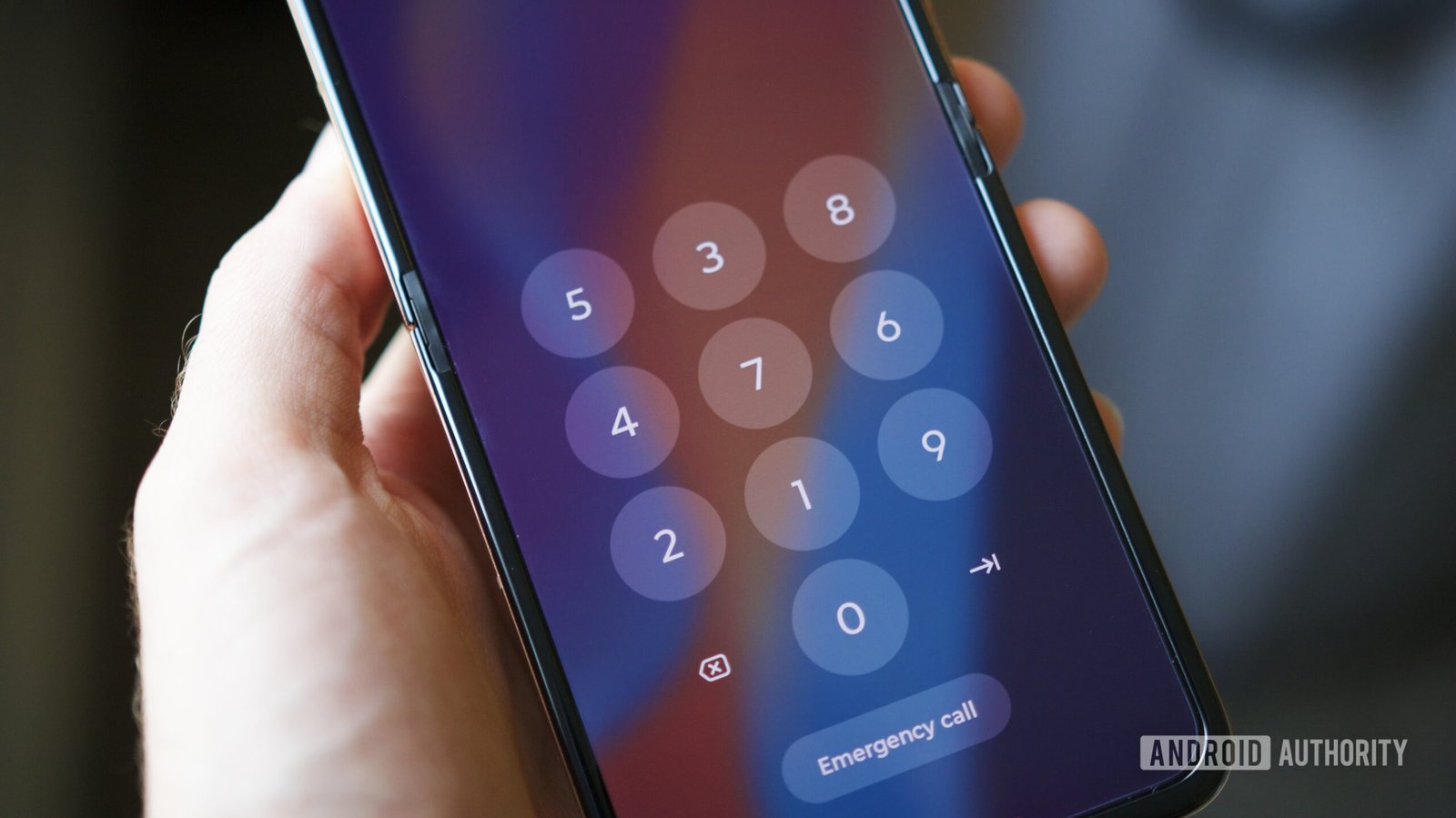
    Motorola phones come with a hidden feature called PIN Scramble that enhances security. This feature randomizes the layout of your PIN pad, making it harder for onlookers to steal your passcode. Instead of the usual number sequence, you might see a completely different arrangement each time you input your PIN.

    To enable PIN Scramble, start by opening the Moto Secure app, which comes preinstalled on most modern Motorola devices. Next, scroll to the Lock Screen Security section. Tap on “PIN pad scramble,” then switch the toggle to enable it.

    If you can’t find Moto Secure, don’t worry. You can access it through the Settings app by following this path: Security & Privacy -> Device Unlock -> Gear Icon next to Screen Lock -> PIN Pad Scramble. Simple steps lead to stronger protection.

    PIN Scramble has been available since at least 2023. So, if you purchased your Motorola in the past couple of years, you’ll likely have access to this feature.

    Why consider using PIN Scramble? First, it significantly reduces the risk of someone figuring out your PIN by observing your input. The constant changes in layout make it nearly impossible for others to memorize your touch pattern. While it may seem slightly inconvenient, the added layer of security is worth it, especially in public settings.

    However, note that this feature is exclusive to Motorola devices. If you own a different brand, like a Samsung or Google Pixel, you won’t have this option. Still, for Motorola users, enabling PIN Scramble is a smart move for safeguarding your data.

    In today’s digital world, enhanced security measures matter more than ever. With features like PIN Scramble, Motorola users can enjoy peace of mind and stronger defenses against potential threats.

    Discover More Technology Insights

    Explore the future of technology with our detailed insights on Artificial Intelligence.

    Discover archived knowledge and digital history on the Internet Archive.

    GadgetsV1

    android Android Security apple cell google iOS mobile Motorola VT1
    Share. Facebook Twitter Pinterest LinkedIn Tumblr Email
    Previous ArticleAddressing the Critical Design Flaw in Humanoid Robots
    Next Article Unlocking Eruption Insights: The Future of Volcano Alerts
    Avatar photo
    Lina Johnson Mercilli
    • Website

    Lina Johnson Marcelli is the editor for IO Tribune, bringing over two decades of experience in journalism to her role. With a BA in Journalism, she is passionate about delivering impactful stories that resonate with readers. Known for her keen editorial vision and leadership, Lina is dedicated to fostering innovative storytelling across the publication. Outside of work, she enjoys exploring new media trends and mentoring aspiring journalists.

    Related Posts

    AI

    Supercharging AI: Unlocking Stellar Results with Language Wizards at MIT!

    February 5, 2026
    Gadgets

    Are VPNs Legal?

    February 5, 2026
    Space

    Unlocking Cosmic Mysteries: The Dance of Merging Neutron Stars

    February 5, 2026
    Add A Comment

    Comments are closed.

    Must Read

    Supercharging AI: Unlocking Stellar Results with Language Wizards at MIT!

    February 5, 2026

    Are VPNs Legal?

    February 5, 2026

    Amazon Germany Hit with $70M Fine for Price Manipulation

    February 5, 2026

    Unlocking Cosmic Mysteries: The Dance of Merging Neutron Stars

    February 5, 2026

    QT Fears: Overblown Crypto Sell-Off?

    February 5, 2026
    Categories
    • AI
    • Crypto
    • Fashion Tech
    • Gadgets
    • IOT
    • OPED
    • Quantum
    • Science
    • Smart Cities
    • Space
    • Tech
    • Technology
    Most Popular

    Meet the $1,000 Heston 120: Marshall’s Debut Dolby Atmos Soundbar

    May 21, 2025

    Tencent Music Acquires Ximalaya: Strengthening Its Audio Empire for 300 Million Users

    June 11, 2025

    Deep-Sea Fish Revolutionize Our Understanding of Earth’s Carbon Cycle

    July 29, 2025
    Our Picks

    Huawei’s Silicon Strategy: Defying Sanctions, Powering China’s AI Future

    June 21, 2025

    AT&T Subscribers Score Major 5G Speed Boost!

    November 18, 2025

    iPhone 17 Specs Unveiled: A Compelling Comparison

    August 28, 2025
    Categories
    • AI
    • Crypto
    • Fashion Tech
    • Gadgets
    • IOT
    • OPED
    • Quantum
    • Science
    • Smart Cities
    • Space
    • Tech
    • Technology
    • Privacy Policy
    • Disclaimer
    • Terms and Conditions
    • About Us
    • Contact us
    Copyright © 2025 Iotribune.comAll Rights Reserved.

    Type above and press Enter to search. Press Esc to cancel.