
Close Menu
    Facebook X (Twitter) Instagram
    Friday, August 28
    Top Stories:
    • Alibaba Expands South American Reach with Brazil AI Data Centers
    • Eating Ultra-Processed Foods Could Increase Prostate Cancer Risk by 30%
    • Huawei and HP Reach Multi-Year Wi-Fi Patent Cross-License Agreement
    Facebook X (Twitter) Instagram Pinterest Vimeo
    IO Tribune
    • Home
    • AI
    • Tech
      • Gadgets
      • Fashion Tech
    • Crypto
    • Smart Cities
      • IOT
    • Science
      • Space
      • Quantum
    • OPED
    IO Tribune
    Home » Unlocking Separate App Sound on Your Samsung: Here’s Why It Matters!
    Gadgets

    Unlocking Separate App Sound on Your Samsung: Here’s Why It Matters!

    Lina Johnson MercilliBy Lina Johnson MercilliFebruary 8, 2026No Comments3 Mins Read
    Share Facebook Twitter Pinterest LinkedIn Tumblr Reddit Telegram Email
    Share
    Facebook Twitter LinkedIn Pinterest Email

    Quick Takeaways

    1. Feature Overview: Samsung’s “Separate App Sound” allows users to play audio from specific apps through different audio sources, enhancing multitasking and user experience.

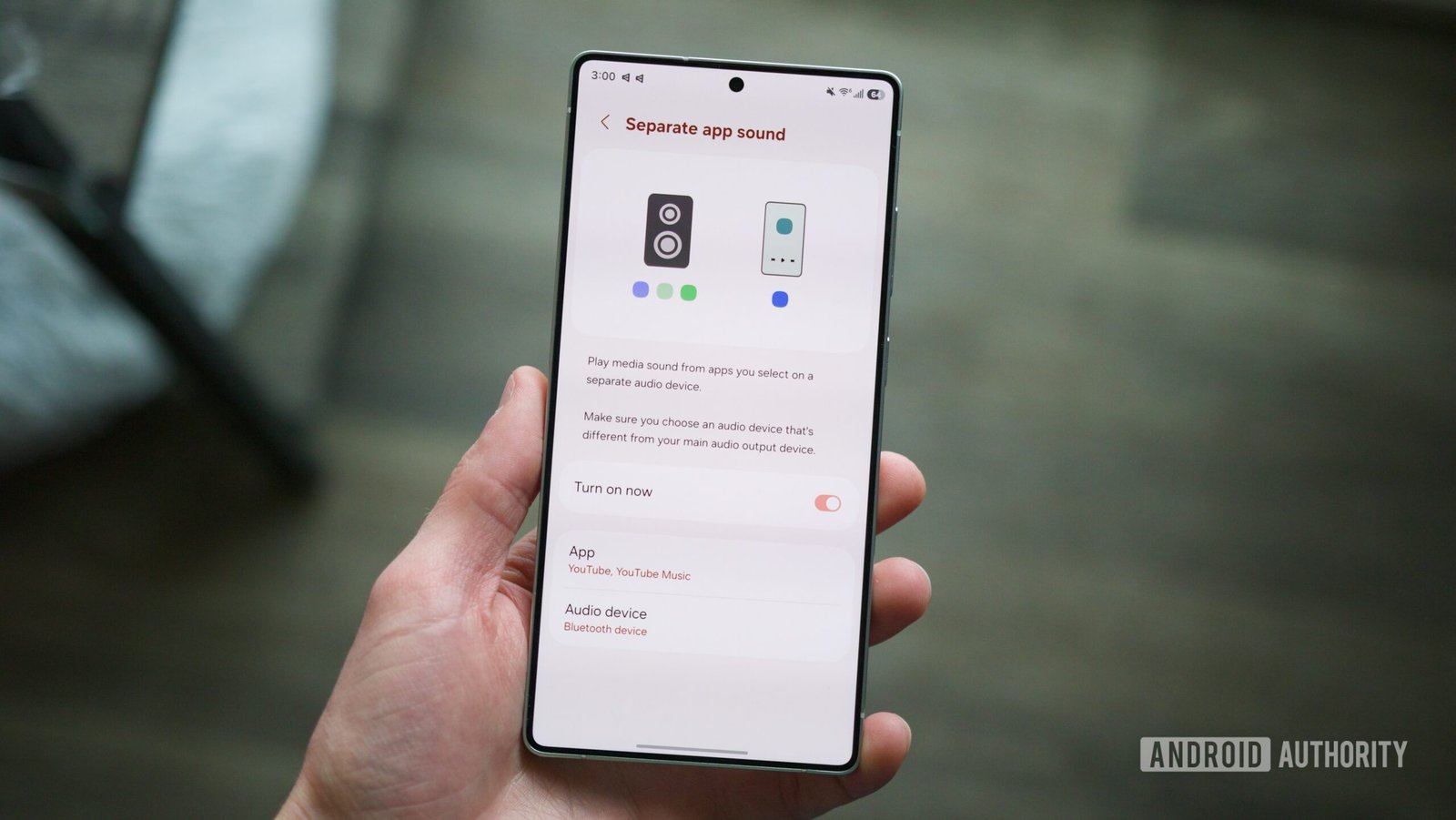
    2. Easy Activation: To enable, navigate to Settings > Sounds and vibrations > Separate app sound, then select desired apps and their audio output.

    3. Practical Use Cases: This feature is ideal for situations like playing music through a Bluetooth speaker while keeping notifications and other audio on the phone’s speaker, preventing interruptions.

    4. Underutilized Tool: Despite debuting with the Galaxy S8 series in 2017, “Separate App Sound” remains under-discussed, presenting a unique advantage for Samsung users over other Android brands.

    Unlocking Samsung’s Separate App Sound: A Guide and Its Benefits

    Samsung phones are packed with innovative features. One of the coolest tools many users overlook is the Separate App Sound function. This feature lets you control audio output on a granular level, which can enhance your listening experience remarkably.

    To get started, open the Settings app on your Samsung device. Next, tap on Sounds and vibrations. Scroll down and find Separate app sound. Toggle the “Turn on now” option. Then, select which apps you want to customize. Finally, decide whether you want that app’s audio to play through your phone or a connected Bluetooth device.

    This setting becomes especially useful in everyday scenarios. For instance, during a gathering, you can stream music through a Bluetooth speaker while keeping alerts on your phone speaker. This way, unexpected calls or notifications won’t disrupt the vibe. Similarly, when in a car, it prevents app notifications from interrupting your playlist, so the music plays uninterrupted.

    Using Separate App Sound opens up new possibilities for multitasking. Whether you’re on a video call and want to keep notifications quiet, or you’re gaming and prefer background music without interruptions, this feature provides flexibility.

    While this functionality has existed since the Galaxy S8 series, many users remain unaware of it. In today’s tech landscape, tools like Separate App Sound can make a significant difference in how we interact with our devices. Samsung leads the way in integrating such features, making their phones stand out in the crowded Android market.

    Embrace this feature today, and enhance your audio experience. You might just find it becomes an indispensable part of your smartphone routine.

    Stay Ahead with the Latest Tech Trends

    Dive deeper into the world of Cryptocurrency and its impact on global finance.

    Stay inspired by the vast knowledge available on Wikipedia.

    GadgetsV1

    android apple cell google iOS mobile Samsung Samsung One UI VT1
    Share. Facebook Twitter Pinterest LinkedIn Tumblr Email
    Previous ArticleCrucial Ocean Factor Overlooked in Climate Models
    Next Article How Low Could XRP Fall? Insights from 4 AIs
    Avatar photo
    Lina Johnson Mercilli
    • Website

    Lina Johnson Marcelli is the editor for IO Tribune, bringing over two decades of experience in journalism to her role. With a BA in Journalism, she is passionate about delivering impactful stories that resonate with readers. Known for her keen editorial vision and leadership, Lina is dedicated to fostering innovative storytelling across the publication. Outside of work, she enjoys exploring new media trends and mentoring aspiring journalists.

    Related Posts

    AI

    AI’s Rise: Are Human Doctors Obsolete?

    August 28, 2026
    AI

    From Theft to Trust: Helping Artists Reclaim their Work

    August 28, 2026
    Science

    Scientists Uncover How Rain Disrupts the Water Cycle

    August 28, 2026
    Add A Comment

    Comments are closed.

    Must Read

    AI’s Rise: Are Human Doctors Obsolete?

    August 28, 2026

    From Theft to Trust: Helping Artists Reclaim their Work

    August 28, 2026

    Scientists Uncover How Rain Disrupts the Water Cycle

    August 28, 2026

    Create an Intro with Shortcuts for Apple CarPlay

    August 28, 2026

    First-ever Double-Blind AI Evaluation by Google DeepMind

    August 28, 2026
    Categories
    • AI
    • Crypto
    • Fashion Tech
    • Gadgets
    • IOT
    • OPED
    • Quantum
    • Science
    • Smart Cities
    • Space
    • Tech
    Most Popular

    DenseNet Unveiled: The Ultimate Connection Rundown!

    April 3, 2026

    Daybreak Initiative Empowers Open-Source to Combat Bugs

    June 23, 2026

    Thriving on the Fringe: Embracing Your Unique Perspective

    January 19, 2026
    Our Picks

    Phoebe Gates and Sophia Kianni Knew Months About Phia’s Cookie Stuffing

    August 11, 2026

    Keep an Eye on This Key Resistance!

    July 6, 2025

    Apple’s App Store Rules Breach EU Policy

    May 29, 2025
    Categories
    • AI
    • Crypto
    • Fashion Tech
    • Gadgets
    • IOT
    • OPED
    • Quantum
    • Science
    • Smart Cities
    • Space
    • Tech
    • Privacy Policy
    • Disclaimer
    • Terms and Conditions
    • About Us
    • Contact us
    Copyright © 2025 Iotribune.comAll Rights Reserved.

    Type above and press Enter to search. Press Esc to cancel.