

Summary Points
- iPhone 17 Pro, Pro Max, and Air have improved dictation systems.
- Advanced Dictation Preview features automatic punctuation and capitalization.
- The feature is off by default while in beta testing.
- Requires at least 12GB RAM; standard iPhones can’t access it.
The Enhanced Dictation Experience of iOS 27
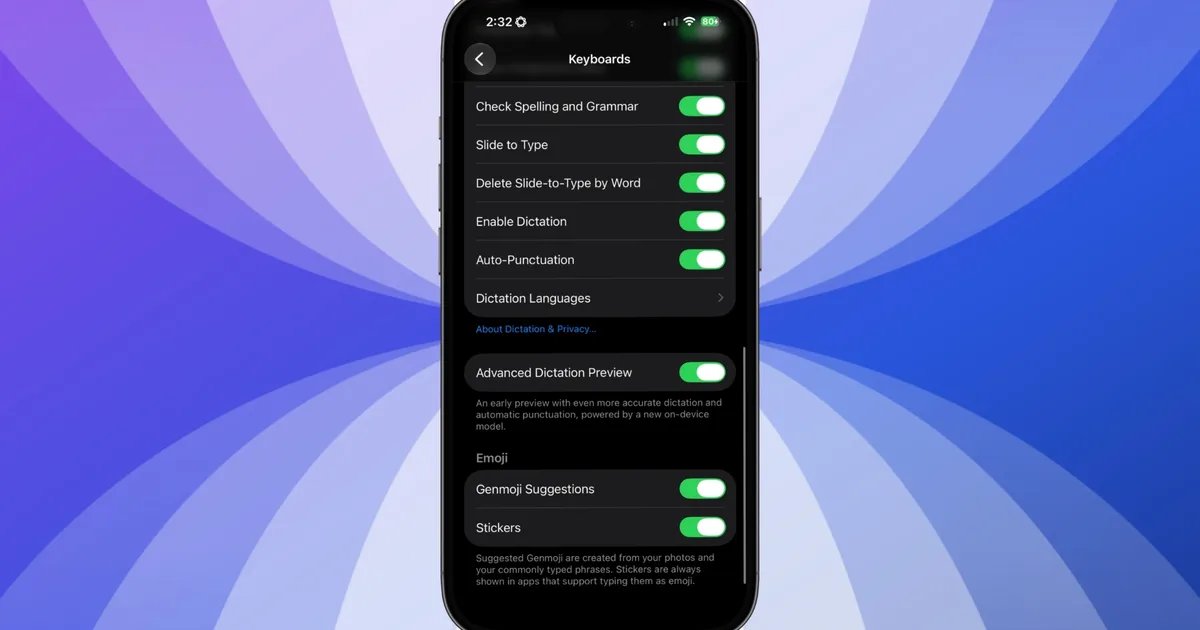
iOS 27 offers a significant upgrade to dictation for users with iPhone 17 Pro, iPhone 17 Pro Max, or iPhone Air. This update introduces an Advanced Dictation Preview, powered by Apple’s AFM Core Advanced model. This new system enhances on-device performance, enabling users to dictate text without needing an internet connection. It automatically handles punctuation and capitalization, streamlining the dictation process.
Despite these advancements, Apple has not turned this feature on by default. Many users remain unaware of its existence. The company has made this choice to gather user feedback while still fine-tuning the feature. If you frequently use voice dictation, you must take the initiative to enable this feature in your settings.
A Hardware Limitation Restricts Access
Not all iPhones running iOS 27 benefit from the Advanced Dictation feature. The new system requires at least 12GB of RAM to function efficiently. Devices like the standard iPhone 17 and iPhone 16 Pro, which have only 8GB of RAM, miss out on this functionality. Therefore, users must check whether their device is compatible before getting excited about the new dictation capabilities.
To enable Advanced Dictation Preview, users can navigate to Settings > General > Keyboards and select the feature. This practical step can lead to a smoother, more accurate dictation experience. As voice recognition technology continues to improve, embracing these innovations will enhance communication and productivity.
Continue Your Tech Journey
Learn how the Internet of Things (IoT) is transforming everyday life.
Discover archived knowledge and digital history on the Internet Archive.
TechV1
