
Close Menu
    Facebook X (Twitter) Instagram
    Sunday, June 14
    Top Stories:
    • Parrots: The Surprise of Naming in the Animal Kingdom!
    • Millipedes: Earth’s Original Land Conquerors
    • Huawei’s ‘Chip Queen’ Returns: Leading Innovation Amid Scaling Law
    Facebook X (Twitter) Instagram Pinterest Vimeo
    IO Tribune
    • Home
    • AI
    • Tech
      • Gadgets
      • Fashion Tech
    • Crypto
    • Smart Cities
      • IOT
    • Science
      • Space
      • Quantum
    • OPED
    IO Tribune
    Home » iOS 26.1 Beta 4: Create Liquid Glass Frosted Effects!
    Gadgets

    iOS 26.1 Beta 4: Create Liquid Glass Frosted Effects!

    Lina Johnson MercilliBy Lina Johnson MercilliOctober 21, 2025No Comments2 Mins Read
    Share Facebook Twitter Pinterest LinkedIn Tumblr Reddit Telegram Email
    Share
    Facebook Twitter LinkedIn Pinterest Email

    Summary Points

    1. New Opacity Toggle: iOS 26.1 Beta 4 introduces a “tinted” setting for the Liquid Glass interface, allowing users to increase opacity and contrast for better visibility.

    2. User Feedback Influence: Apple made this design change in response to widespread user feedback advocating for a more opaque option.

    3. Wide Impact: The tinted setting impacts various areas across iOS, including apps and lock screen notifications, enhancing overall user experience.

    4. Additional Features: The latest beta includes a Camera swipe toggle, slide-to-stop for alarms, Settings updates, new languages, and a revised Apple TV app icon.

    Apple Revamps Liquid Glass in iOS 26.1 Beta 4

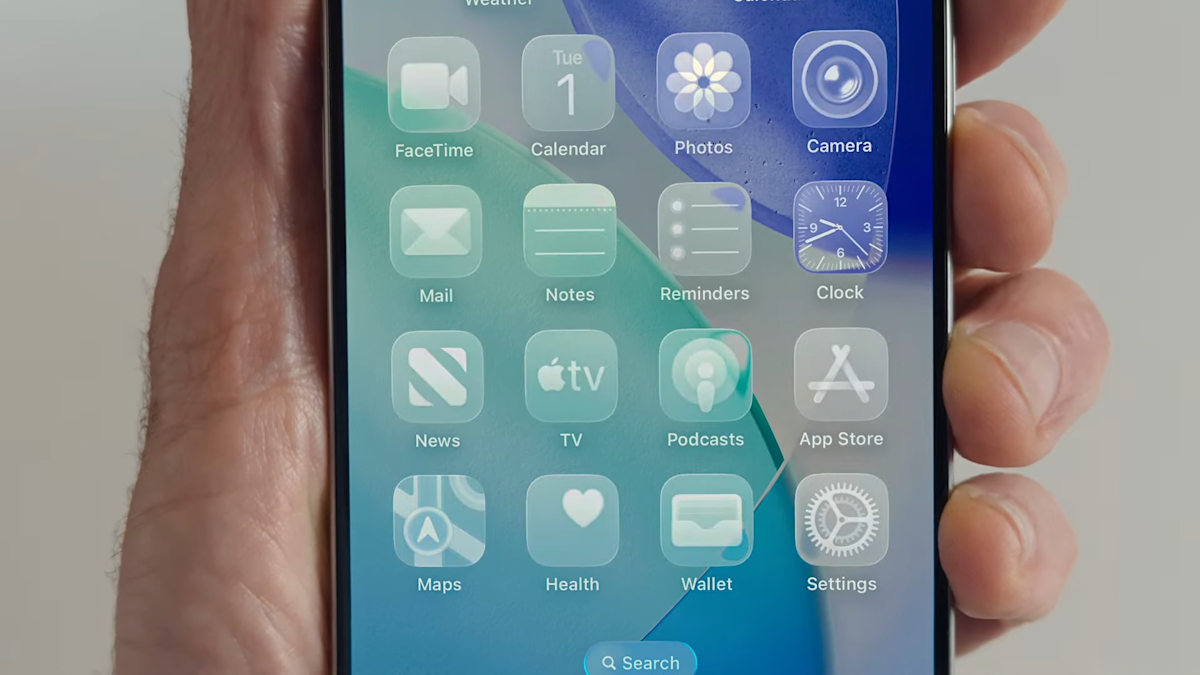
    Apple’s latest update, iOS 26.1 Beta 4, introduces an exciting feature that enhances the Liquid Glass interface. Users can now opt for a “tinted” setting, which increases opacity and contrast. This change allows elements to stand out more clearly against the background.

    Previously, the Liquid Glass design received mixed reviews. Many users expressed dissatisfaction with its transparency. Therefore, Apple responded to feedback and made this adjustment. Now, users can choose between a clear option, which reveals content beneath, and the new tinted option.

    The toggle is easily accessible. Navigate to Settings > Display and Brightness on iPhone or iPad, or System Settings > Appearance on macOS. This user-driven decision marks a significant shift in Apple’s design philosophy, showing that the company values feedback.

    Moreover, the changes apply across various aspects of iOS, affecting apps and lock screen notifications. The new beta also includes other helpful features, such as a camera swipe toggle and an updated Apple TV app icon.

    This update reflects Apple’s commitment to innovation and user satisfaction. It’s a step forward that aligns with the growing trend of using technology to create more personalized experiences. As smart cities evolve, such features boost accessibility and enhance daily interactions with technology.

    For those enrolled in the beta program, the upgrade is available for download now. Users can explore these enhancements and discover how they can improve their experience.

    Continue Your Tech Journey

    Learn how the Internet of Things (IoT) is transforming everyday life.

    Access comprehensive resources on technology by visiting Wikipedia.

    GadgetsV1

    android apple cell google iOS latest iOS Liquid Glass mobile System Settings VT1
    Share. Facebook Twitter Pinterest LinkedIn Tumblr Email
    Previous ArticleAura’s Cord-Free Color E Ink Frame: Freedom Meets Style
    Next Article Unlocking Mysteries: Europa Clipper’s Stellar Performance at Mars
    Avatar photo
    Lina Johnson Mercilli
    • Website

    Lina Johnson Marcelli is the editor for IO Tribune, bringing over two decades of experience in journalism to her role. With a BA in Journalism, she is passionate about delivering impactful stories that resonate with readers. Known for her keen editorial vision and leadership, Lina is dedicated to fostering innovative storytelling across the publication. Outside of work, she enjoys exploring new media trends and mentoring aspiring journalists.

    Related Posts

    Gadgets

    Ultimate Biometric Smart Lock: SwitchBot Lock Vision Pro Review

    June 14, 2026
    AI

    Vision LLMs: Unlocking PDF Charts & Diagrams

    June 14, 2026
    Crypto

    Bitcoin Difficulty Drops 10%, Miner Pressure Intensifies

    June 14, 2026
    Add A Comment

    Comments are closed.

    Must Read

    Ultimate Biometric Smart Lock: SwitchBot Lock Vision Pro Review

    June 14, 2026

    Vision LLMs: Unlocking PDF Charts & Diagrams

    June 14, 2026

    Bitcoin Difficulty Drops 10%, Miner Pressure Intensifies

    June 14, 2026

    Parrots: The Surprise of Naming in the Animal Kingdom!

    June 14, 2026

    Tiny Chip Packs a Laser Once Big Lab-Size

    June 14, 2026
    Categories
    • AI
    • Crypto
    • Fashion Tech
    • Gadgets
    • IOT
    • OPED
    • Quantum
    • Science
    • Smart Cities
    • Space
    • Tech
    • Technology
    Most Popular

    China’s Crypto Giants Face Ethereum DAT Dreams Crumbling in a Harsh Market

    November 23, 2025

    Unearthing Ötzi: A Tale of Two Ancestries

    July 21, 2025

    Top Internet Providers in Chicago

    August 6, 2025
    Our Picks

    Taiwan’s Tech: Pioneering Global Digital Trust

    December 3, 2025

    BTC Eyes New Summer Highs if $73K Holds

    June 2, 2026

    Huawei and DeepSeek Boost China’s AI Self-Reliance with V4 Model Collaboration

    April 25, 2026
    Categories
    • AI
    • Crypto
    • Fashion Tech
    • Gadgets
    • IOT
    • OPED
    • Quantum
    • Science
    • Smart Cities
    • Space
    • Tech
    • Technology
    • Privacy Policy
    • Disclaimer
    • Terms and Conditions
    • About Us
    • Contact us
    Copyright © 2025 Iotribune.comAll Rights Reserved.

    Type above and press Enter to search. Press Esc to cancel.