

Top Highlights
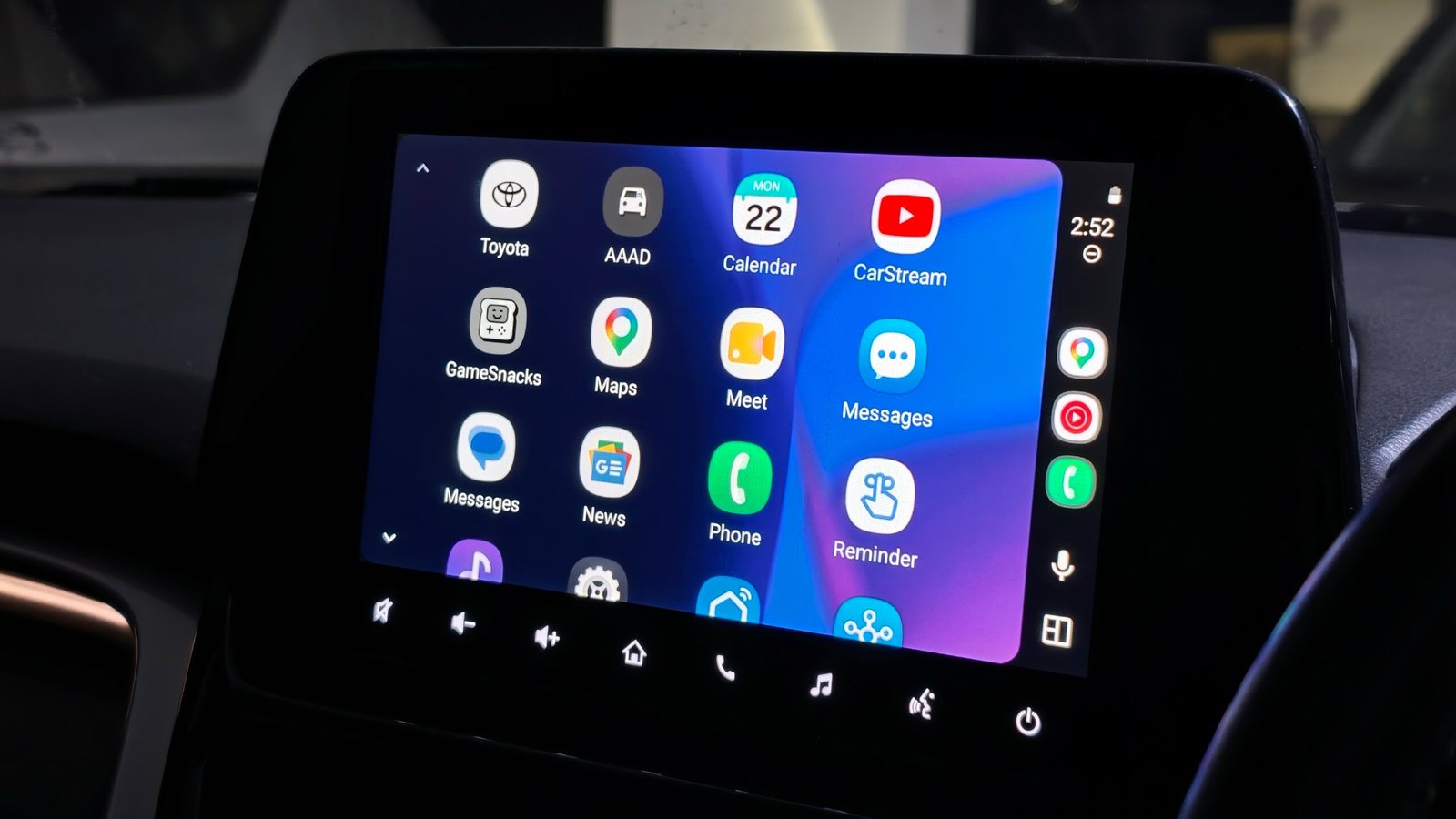
- Sanuj Bhatia reveals that Android Auto can be customized beyond official apps by sideloading third-party applications through a simple, three-step process involving enabling Developer Mode, allowing unknown sources, and installing the Android Auto Apps Downloader (AAAD).
- The article highlights that third-party apps like CarStream, AAMirror, and Fermata Auto significantly expand Android Auto’s capabilities, enabling YouTube streaming, screen mirroring, and browsing, which are not officially supported.
- Bhatia emphasizes that while these third-party extensions make Android Auto more versatile, they also pose distractions and safety concerns, advising most users to stick to Google’s official features for safe driving.
- The article cautions that Google frequently patches sideloading methods, and paid versions of AAAD may stop functioning after updates, making this customization risky and not recommended for the majority.
Unlocking New Possibilities Beyond Google’s Limits
Many Android Auto users believe they are limited to the features Google provides. However, recent discoveries show there’s more under the surface. By sideloading third-party apps, users can enhance their experience significantly. This process doesn’t require advanced technical skills, just some steps to enable developer settings. Once accessed, a world of options opens up—apps that let you watch videos, mirror your phone, or browse the web, all on your car’s display.
Google sets restrictions for safety reasons, but those limits also restrict what you can do. Sideloading opens the door to customization, making your driving time more engaging. For example, you can now stream YouTube videos through apps like CarStream, which bypass Google’s restrictions. Similarly, apps like AAMirror let you display your full phone screen on the dashboard, enabling a versatile multimedia experience.
While these features sound exciting, it’s essential to maintain a responsible perspective. The potential enhancements come with risks, such as possible software patches from Google that block sideloaded apps. Safety always comes first; watching videos or browsing the web while driving can be dangerous. Still, knowing how to extend Android Auto’s capabilities empowers users to decide what suits their preferences—and their comfort with risk.
Steps to Sideload Apps Safely and Effectively
Getting third-party apps onto Android Auto involves a few straightforward steps. First, you need to enable Developer Mode on your Android device. This involves tapping the build number in Settings seven times, unlocking advanced options. Next, you must activate Developer Mode within Android Auto. This process includes navigating through Android Auto settings and tapping multiple times on the version info to reveal developer options.
Once you have Developer Mode active, the next step involves permitting the installation of apps from unknown sources. This setting allows you to install apps that aren’t available on the Google Play Store. The final major step is downloading an app called Android Auto Apps Downloader (AAAD). This app acts as an unofficial storefront, giving access to third-party Android Auto-compatible applications.
Since AAAD isn’t available on Google’s official store, you’ll need to download its APK from a trusted source, such as the developer’s GitHub page. After installing AAAD and granting the necessary permissions, you can browse and download compatible apps. Paying a small fee for the Pro version unlocks unlimited downloads, making the process smoother over time. Though it’s not entirely risk-free, these steps are simple enough for most enthusiast users to follow without heavy technical expertise.
Enhancing Your Drive—But With Caution
Sideloaded apps add exciting features to your Android Auto system. Watching YouTube videos or mirroring your phone’s screen during traffic might feel like a game-changer. You can access streaming services, browse websites, and play local videos, transforming your dashboard into a multimedia hub. Certain apps even enable web browsing and IPTV streaming, giving you entertainment options that Google’s official apps don’t provide.
However, it’s vital to keep safety in mind. Most of these added functionalities are best used when the vehicle is stationary. Watching videos or browsing online while driving can be distracting and dangerous. Google’s restrictions aim to prevent that, but with caution, some users find these extensions useful during parking or short stops.
It’s also important to recognize that Google actively patches these sideloading methods with software updates. An update might disable your ability to add third-party apps suddenly. As a result, this customization remains a semi-permanent experiment—fun to explore but not recommended for everyday driving. Ultimately, the value lies in knowing your options, but safety and legality should guide how you implement them.
Stay Ahead with the Latest Tech Trends
Explore the future of technology with our detailed insights on Artificial Intelligence.
Access comprehensive resources on technology by visiting Wikipedia.
CellphonesV1
