
Close Menu
    Facebook X (Twitter) Instagram
    Sunday, April 19
    Top Stories:
    • 250-Million-Year-Old Fossil Confirms Mammals’ Egg-Laying Ancestors
    • Unraveling 160 Million Years of Mystery: A Fossil Discovery Like No Other!
    • Breakthrough Discovery: Scientists Find Way to Halt Common Virus Carried by 95%!
    Facebook X (Twitter) Instagram Pinterest Vimeo
    IO Tribune
    • Home
    • AI
    • Tech
      • Gadgets
      • Fashion Tech
    • Crypto
    • Smart Cities
      • IOT
    • Science
      • Space
      • Quantum
    • OPED
    IO Tribune
    Home » Transforming Android Quick Settings into a Smart Home Hub
    Gadgets

    Transforming Android Quick Settings into a Smart Home Hub

    Lina Johnson MercilliBy Lina Johnson MercilliDecember 21, 2025No Comments3 Mins Read
    Share Facebook Twitter Pinterest LinkedIn Tumblr Reddit Telegram Email
    Share
    Facebook Twitter LinkedIn Pinterest Email

    Quick Takeaways

    1. Quick Settings Revamp: Android 16’s update allows collapsing toggles to fit more options, reigniting interest in Quick Settings after uninspiring design changes in previous versions.

    2. Smart Home Control: The introduction of customizable tiles with Home Assistant enables direct control of multiple smart devices, transforming Quick Settings into a comprehensive smart home panel.

    3. User-Friendly Setup: Adding Home Assistant tiles for functions like adjusting a standing desk is straightforward and significantly reduces the hassle of using cumbersome apps or manual controls.

    4. Limitations of Google Home: Google Home’s lack of customizable tiles for individual device control prompts users to seek alternative solutions like Home Assistant, emphasizing the demand for more versatile smart home management tools.

    Transforming Android’s Quick Settings into a Smart Home Hub

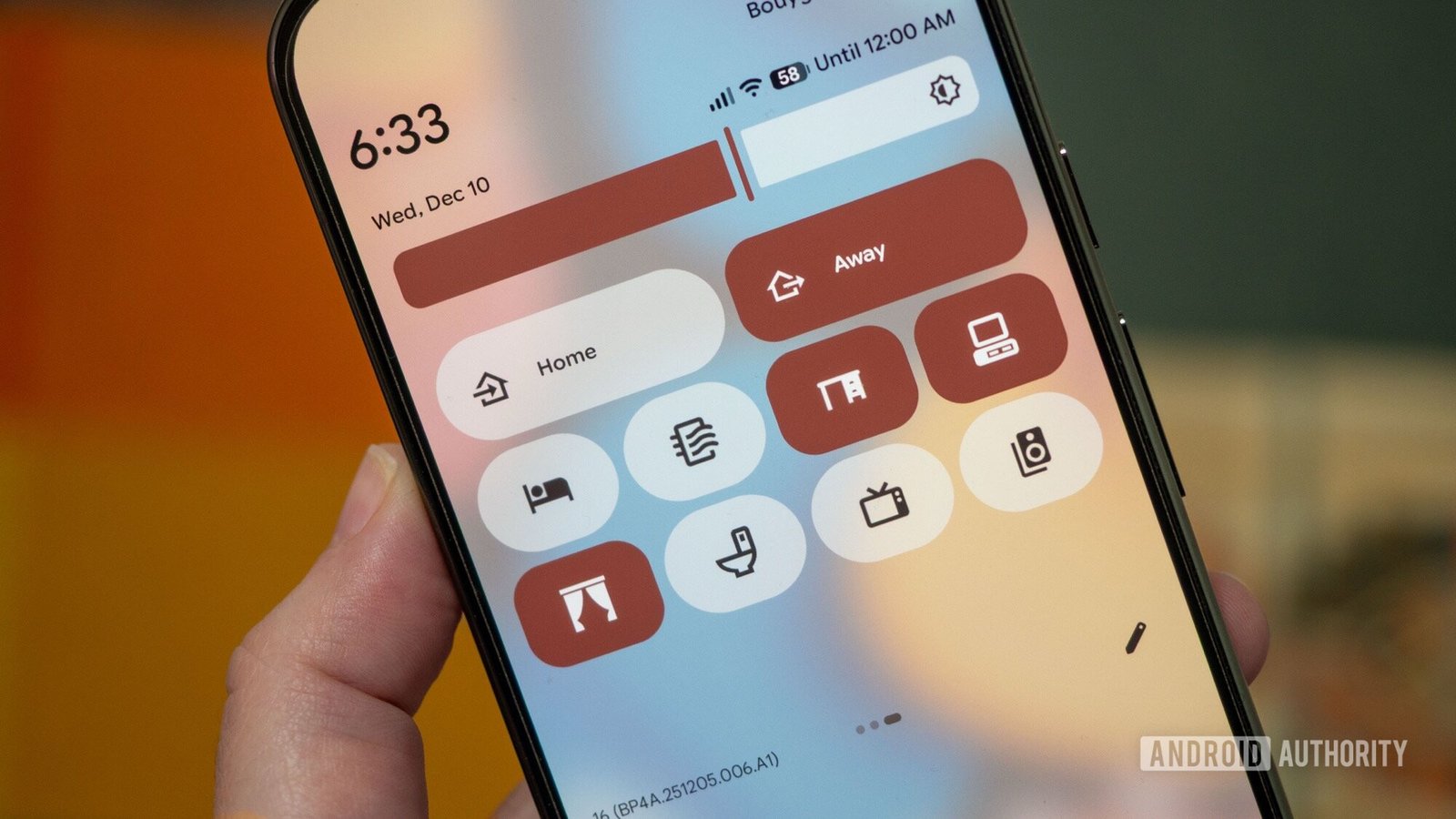
    With the latest update to Android 16, users have newfound flexibility in managing Quick Settings. This change allows for smaller toggles, giving more options on a single screen. I decided to use this feature to control my smart home setup, transforming my notification panel into a centralized hub.

    Initially, I relied on Google Home. However, it provided limited access. Instead of direct control, it merely opened a menu for favorite devices. This approach felt cumbersome and inefficient. I wanted something more responsive.

    Then, I discovered Home Assistant. This platform offers extensive customization for smart home management. I found 12 fully customizable tiles ready for use within Quick Settings. This capability was precisely what I needed.

    My first task involved controlling my standing desk. Initially, the desk’s Bluetooth app proved frustrating, requiring too many steps to adjust heights. By integrating Home Assistant, I added two toggles directly in Quick Settings. Now, I can raise or lower my desk with a simple tap—no more fiddling with the app.

    Adding these buttons was straightforward. I just dragged the tiles into place, assigned actions, and selected icons within moments. This simple process opened up a world of smart home automation directly from my phone.

    Encouraged by the success with my desk, I explored other devices. With 40 tiles available, I faced the exciting challenge of optimizing my setup. I included buttons for my Roborock vacuum, curtains, and even scene settings for home modes.

    Despite Google Home’s functionality, it lacks the granularity I now enjoy through Home Assistant. Custom tiles eliminate the need to navigate through menus. As a result, I have a fully functional smart home panel right at my fingertips.

    This experience underscores the importance of innovation in urban living. Smart homes contribute to efficiency and convenience, enhancing daily life. As cities adopt more technological solutions, these innovations will reshape how we manage our environments.

    Expanding smart home integration can lead to improved quality of life in urban areas. With tools like Quick Settings, the possibilities for streamlined living continue to grow.

    Continue Your Tech Journey

    Explore the future of technology with our detailed insights on Artificial Intelligence.

    Access comprehensive resources on technology by visiting Wikipedia.

    GadgetsV1

    android Android 16 apple cell google Google Home iOS mobile Smart Home VT1
    Share. Facebook Twitter Pinterest LinkedIn Tumblr Email
    Previous ArticleCartagena: Transitioning from Horse Carriages to Electric Buggies
    Next Article Electric Startups Fear Setback as EU Softens 2035 EV Targets
    Avatar photo
    Lina Johnson Mercilli
    • Website

    Lina Johnson Marcelli is the editor for IO Tribune, bringing over two decades of experience in journalism to her role. With a BA in Journalism, she is passionate about delivering impactful stories that resonate with readers. Known for her keen editorial vision and leadership, Lina is dedicated to fostering innovative storytelling across the publication. Outside of work, she enjoys exploring new media trends and mentoring aspiring journalists.

    Related Posts

    AI

    Master Data Science with Python Fast in 2026—No Wasted Time!

    April 19, 2026
    Gadgets

    Amazon’s Fire TV Stick HD Ends Sideloading—A New Era Begins

    April 19, 2026
    AI

    AI Agents Need a Home—Git Worktrees Make It Happen

    April 19, 2026
    Add A Comment

    Comments are closed.

    Must Read

    Master Data Science with Python Fast in 2026—No Wasted Time!

    April 19, 2026

    Amazon’s Fire TV Stick HD Ends Sideloading—A New Era Begins

    April 19, 2026

    AI Agents Need a Home—Git Worktrees Make It Happen

    April 19, 2026

    Garinex’s Successor, Grinex, Falls Days After Coordinated Wallet Attack

    April 18, 2026

    Silent Voices: How Music and Traffic Noise Shape Our Imagination

    April 18, 2026
    Categories
    • AI
    • Crypto
    • Fashion Tech
    • Gadgets
    • IOT
    • OPED
    • Quantum
    • Science
    • Smart Cities
    • Space
    • Tech
    • Technology
    Most Popular

    Apple Watch SE 3: The Surprising Underdog Steals the Spotlight

    December 11, 2025

    Top Internet Providers in West Valley City

    February 27, 2025

    How Dancing Turtles Navigate Our World

    February 13, 2025
    Our Picks

    China Alerts Kuaishou and Weibo: Celebrity Gossip Under Fire

    September 23, 2025

    Get Excited! Fresh Leak Reveals Stunning Pixel 10 Pro Details!

    August 4, 2025

    Is Trusting Google Still Possible?

    September 27, 2025
    Categories
    • AI
    • Crypto
    • Fashion Tech
    • Gadgets
    • IOT
    • OPED
    • Quantum
    • Science
    • Smart Cities
    • Space
    • Tech
    • Technology
    • Privacy Policy
    • Disclaimer
    • Terms and Conditions
    • About Us
    • Contact us
    Copyright © 2025 Iotribune.comAll Rights Reserved.

    Type above and press Enter to search. Press Esc to cancel.