
Close Menu
    Facebook X (Twitter) Instagram
    Monday, April 27
    Top Stories:
    • Samsung’s Game-Changer: The Must-See Wide Foldable Phone
    • Freshmen with World Domination Dreams: The Book that Fuels Their Ambition
    • Chinese LED Firm’s Acquisition of Dutch Company Falls Through Amid US Opposition
    Facebook X (Twitter) Instagram Pinterest Vimeo
    IO Tribune
    • Home
    • AI
    • Tech
      • Gadgets
      • Fashion Tech
    • Crypto
    • Smart Cities
      • IOT
    • Science
      • Space
      • Quantum
    • OPED
    IO Tribune
    Home » EcoFlow Recalls 25,000 Delta Max 2000 Power Stations: Fix Your Fire Hazard Now!
    IOT

    EcoFlow Recalls 25,000 Delta Max 2000 Power Stations: Fix Your Fire Hazard Now!

    Staff ReporterBy Staff ReporterOctober 9, 2025No Comments3 Mins Read
    Share Facebook Twitter Pinterest LinkedIn Tumblr Reddit Telegram Email
    Share
    Facebook Twitter LinkedIn Pinterest Email

    Fast Facts

    1. Recall Announcement: EcoFlow recalls about 25,030 Delta Max 2000 portable power stations (model EFD310) due to a fire hazard, with six reported incidents causing over $850,000 in damages.

    2. No Return Necessary: Owners do not need to return the affected units; the issue can be fixed via a simple firmware update that takes approximately five minutes.

    3. Immediate Action Required: Users should stop using the Delta Max 2000 until the firmware update is installed, which can be done through the official EcoFlow app.

    4. Support Available: For assistance, customers can contact EcoFlow via email or phone, and options for manual updates through customer support are provided if the app update fails.

    EcoFlow Issues Recall for Delta Max 2000 Power Stations

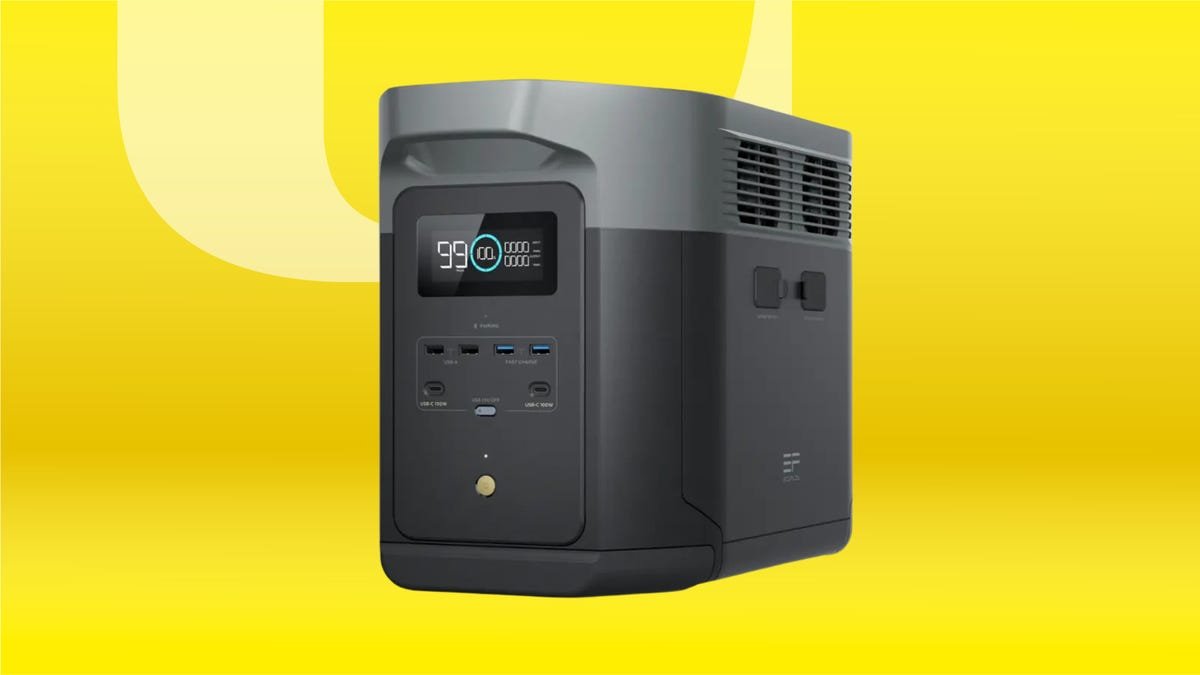
    EcoFlow announced a voluntary recall of approximately 25,030 Delta Max 2000 portable power stations. The company partnered with the U.S. Consumer Product Safety Commission (CPSC) after reports indicated a fire hazard. Specifically, the models, identified as EFD310, risk overheating and igniting, potentially causing serious burn injuries and property damage. Six incidents have resulted in over $850,000 worth of property damage, highlighting the urgency of the situation.

    Fortunately, EcoFlow allows owners to address this issue without returning the power station. Instead, users can quickly resolve the hazard through a firmware update, a straightforward process that takes about five minutes. This approach underscores EcoFlow’s commitment to customer safety and product reliability, even when challenges arise.

    Steps to Update Your Device

    If you own the EcoFlow Delta Max 2000, stop using it immediately. Begin the update with the official EcoFlow app. Start by downloading the app from the App Store or Google Play Store. After logging in, connect your power station. Verify that the serial number displayed matches the one on the device. This step ensures you’re updating the correct model.

    Next, head to the device settings and select “Firmware Upgrade.” Initiate the update process and wait for it to complete, ensuring the firmware version reaches 1.6.2.81. If the upgrade fails, contact EcoFlow customer support for assistance. They can provide additional help, including a prepaid return label if needed. EcoFlow emphasizes customer safety and aims to make this process seamless for affected users.

    For further questions, reach EcoFlow’s support via phone at 833-424-4137 or email at deltamax2000@ecoflow.com. Visit their website to access detailed recall information and upgrade guidance.

    Stay Ahead with the Latest Tech Trends

    Explore the future of technology with our detailed insights on Artificial Intelligence.

    Access comprehensive resources on space and science by visiting NASA.

    IoTV1

    5G Connected Cities IOT Smart Cities VT1
    Share. Facebook Twitter Pinterest LinkedIn Tumblr Email
    Previous ArticleUnited Minds: The Future of Collective Machine Intelligence
    Next Article Data Breach Alert: Dozens of Organizations Targeted in Oracle-Linked Hacks
    Avatar photo
    Staff Reporter
    • Website

    John Marcelli is a staff writer for IO Tribune, with a passion for exploring and writing about the ever-evolving world of technology. From emerging trends to in-depth reviews of the latest gadgets, John stays at the forefront of innovation, delivering engaging content that informs and inspires readers. When he's not writing, he enjoys experimenting with new tech tools and diving into the digital landscape.

    Related Posts

    Tech

    Samsung’s Game-Changer: The Must-See Wide Foldable Phone

    April 27, 2026
    Gadgets

    Viral Videos Reveal Samsung Phones Melting Plastic—Here’s Why

    April 27, 2026
    AI

    Ivory Tower Notes: The Methodology Unveiled

    April 27, 2026
    Add A Comment

    Comments are closed.

    Must Read

    Samsung’s Game-Changer: The Must-See Wide Foldable Phone

    April 27, 2026

    Viral Videos Reveal Samsung Phones Melting Plastic—Here’s Why

    April 27, 2026

    Ivory Tower Notes: The Methodology Unveiled

    April 27, 2026

    遠藤さくらが探る、下北沢の新古着店

    April 27, 2026

    Shining Stars: Celebrating Excellence in Space Leadership

    April 27, 2026
    Categories
    • AI
    • Crypto
    • Fashion Tech
    • Gadgets
    • IOT
    • OPED
    • Quantum
    • Science
    • Smart Cities
    • Space
    • Tech
    • Technology
    Most Popular

    XRP: The Calm Before the Storm?

    March 16, 2025

    Why Bitcoin’s Rising HODLers Signal Bearish Trends

    February 24, 2026

    Unveiling the Price of IKEA’s Innovative Donut-Shaped Smart Lamp!

    January 17, 2026
    Our Picks

    Solana Foundation Teams Up with Wavebridge for KRW Stablecoin

    October 14, 2025

    Tencent Revives Bond Market with First Sale in Four Years

    September 15, 2025

    Unlocking the Mystery: Hidden Gut Trigger Linked to ALS and Dementia

    April 11, 2026
    Categories
    • AI
    • Crypto
    • Fashion Tech
    • Gadgets
    • IOT
    • OPED
    • Quantum
    • Science
    • Smart Cities
    • Space
    • Tech
    • Technology
    • Privacy Policy
    • Disclaimer
    • Terms and Conditions
    • About Us
    • Contact us
    Copyright © 2025 Iotribune.comAll Rights Reserved.

    Type above and press Enter to search. Press Esc to cancel.