

Quick Takeaways
- Google is bringing Gemini conversational assistance to Google Maps on CarPlay.
- Drivers can tap a new Gemini icon to ask questions while navigating.
- Gemini can help find stops, learn about places, and report traffic disruptions—including through multi-part questions.
- The rollout is starting for CarPlay users in the US and worldwide, and may take several days to reach everyone.
Now You Can Chat With Gemini While Using Google Maps Through CarPlay
A small icon brings a more conversational drive
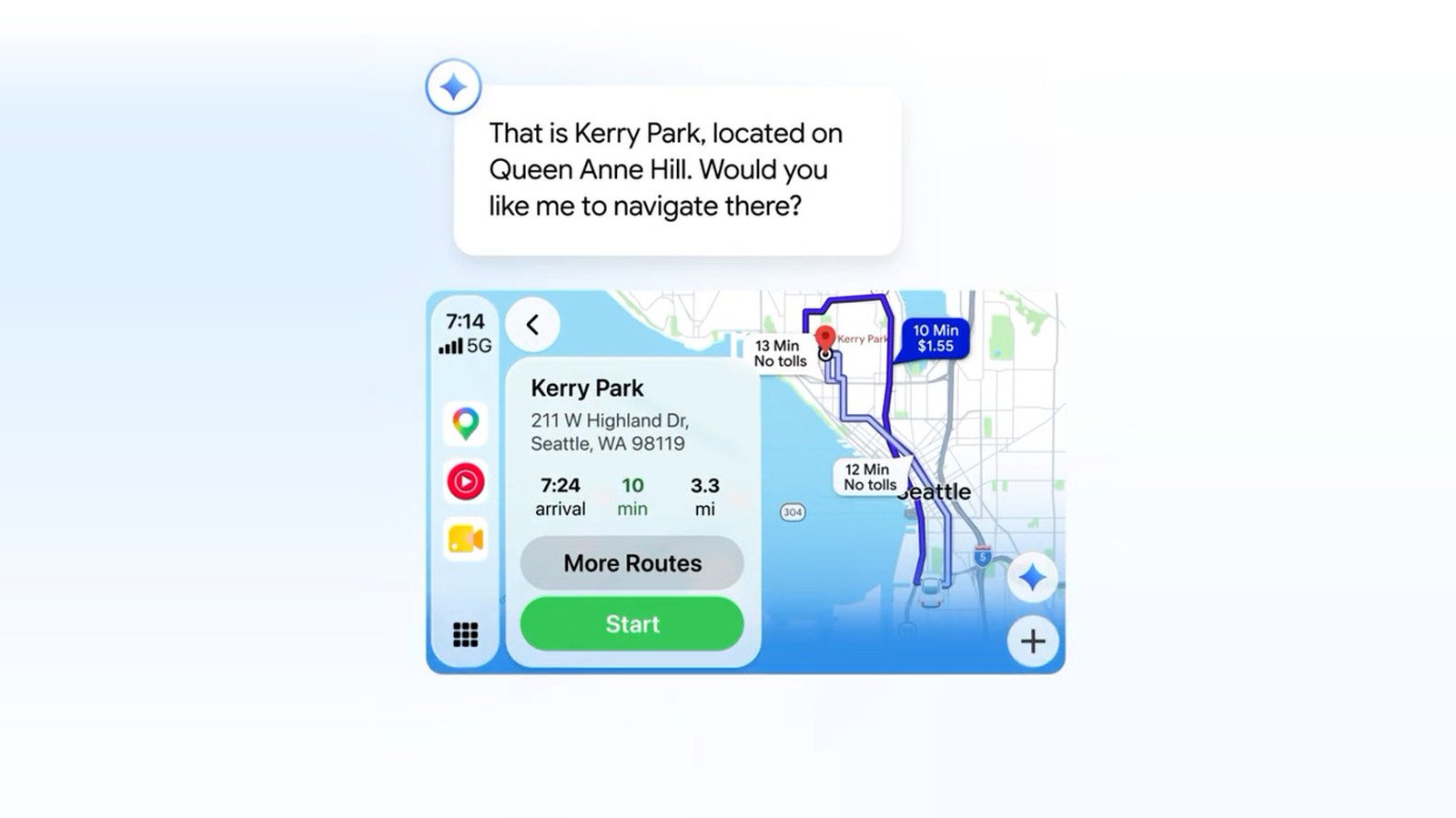
Google Maps on Apple CarPlay is getting a new way to find information on the road. Google has begun rolling out Gemini in navigation to CarPlay users in the United States and around the world.
The change is easy to spot. Open Google Maps on your CarPlay screen, and a Gemini icon appears near the lower-right corner. Tap it to start asking questions.
That small button could make a familiar drive feel more flexible. Instead of searching through menus or trying to phrase a narrow query, drivers can ask for recommendations in everyday language. Google says Gemini can help find stops, report traffic disruptions and share details about nearby places.
For example, a driver might ask, “What park is famous for gorgeous views overlooking the city?” That kind of question combines a place search with a request for a particular experience. Google says Gemini handles multi-part questions especially well.
The change also reflects how people use navigation. A route rarely tells the whole story. Drivers may want a coffee shop, a scenic stop or another detail before they decide where to go next. A conversational assistant can make those requests feel more natural.
Useful help, with limits worth keeping in mind
Gemini adds a new layer to Google Maps, but it does not replace the basic job of navigation. Maps still guides drivers along a route. Gemini gives them another way to ask questions while they use the app.
That distinction matters. A chatbot can make it easier to explore options, but drivers should still focus on traffic and road conditions. Tapping the Gemini icon requires attention, so it makes sense to start a conversation only when it is safe. Drivers can also pull over before handling a longer or more involved request.
The feature’s value will depend on how well it understands questions and how clearly it responds. A quick request for a nearby stop may save time. A vague or complicated prompt may still require follow-up. And an assistant’s suggestion does not guarantee that a place fits every traveler’s needs.
Still, the conversational format offers a welcome alternative to tapping through several screens. It may prove especially helpful when a passenger wants to explore choices or when a driver needs a quick detail about a destination. The key is to treat Gemini as a tool, not a substitute for attention or judgment.
Google says the rollout has begun, but the icon may not appear for everyone right away. The update could take a few days to reach individual devices. If it has not shown up yet, check again later.
CarPlay update arrives alongside a separate Android Auto feature
The CarPlay addition follows another recent announcement from Google about Gemini Personal Intelligence for Android Auto. That feature can draw on information from a user’s other Google apps, when enabled, to make responses more tailored.
The two updates share a broader aim: Make in-car assistance more conversational and more useful. However, they work differently. Gemini in Google Maps on CarPlay helps users ask navigation-related questions. Personal Intelligence on Android Auto can use information from connected Google apps to personalize answers.
That difference also raises a practical consideration. Personalization can make responses more specific, but it depends on information from other apps. Users should understand what they enable and decide whether that trade-off suits them.
For CarPlay users who already prefer Google Maps, the new Gemini icon offers a simple reason to try a different kind of navigation interaction. It does not transform the screen or rewrite the driving experience. Instead, it adds a more natural way to ask for help—one question, or one detour, at a time.
Expand Your Tech Knowledge
Dive deeper into the world of Cryptocurrency and its impact on global finance.
Explore past and present digital transformations on the Internet Archive.
CellphonesV1
