
Close Menu
    Facebook X (Twitter) Instagram
    Saturday, May 16
    Top Stories:
    • Alibaba and Tencent’s contrasting AI investment strategies Revealed
    • Genmab Withdraws Two Antibody Assets, Includes ProfoundBio ADC
    • Dai Dai: Shakira & Burna Boy Unite for World Cup Anthem!
    Facebook X (Twitter) Instagram Pinterest Vimeo
    IO Tribune
    • Home
    • AI
    • Tech
      • Gadgets
      • Fashion Tech
    • Crypto
    • Smart Cities
      • IOT
    • Science
      • Space
      • Quantum
    • OPED
    IO Tribune
    Home » Unlocking Android Auto Developer Settings: Worth It or Not?
    Gadgets

    Unlocking Android Auto Developer Settings: Worth It or Not?

    Lina Johnson MercilliBy Lina Johnson MercilliDecember 5, 2025No Comments3 Mins Read
    Share Facebook Twitter Pinterest LinkedIn Tumblr Reddit Telegram Email
    Share
    Facebook Twitter LinkedIn Pinterest Email

    Top Highlights

    1. Enable Developer Mode: Unlocking Android Auto developer settings enhances your driving experience by providing valuable features, including wireless functionality and access to unknown sources for app installations.

    2. Access Process: To enable developer settings, navigate to the Android Auto app settings, tap the version number multiple times, and confirm activation when prompted.

    3. Key Features: The main user-friendly settings in developer mode are Wireless Android Auto (for cable-free use) and the Unknown Sources toggle (to display non-Play Store apps).

    4. Evaluating Usefulness: For casual users who don’t need wireless connections or third-party apps, unlocking developer mode may not be necessary.

    Unlocking Android Auto Developer Settings: Should You Do It?

    Android Auto enhances your driving experience by integrating your phone with your car. For power users, tapping into developer settings can offer useful features. However, it’s essential to know what you gain and if it’s worth your time.

    To unlock Android Auto developer settings, start on your Android device. First, navigate to the app settings for Android Auto. Depending on your phone, you may find it in different locations. For Samsung users, access it via Settings > Apps > Android Auto > Configure in Android Auto. Google Pixel users can go through Settings > Apps > See all apps > Android Auto > Additional settings. Alternatively, simply search “Android Auto” in your settings.

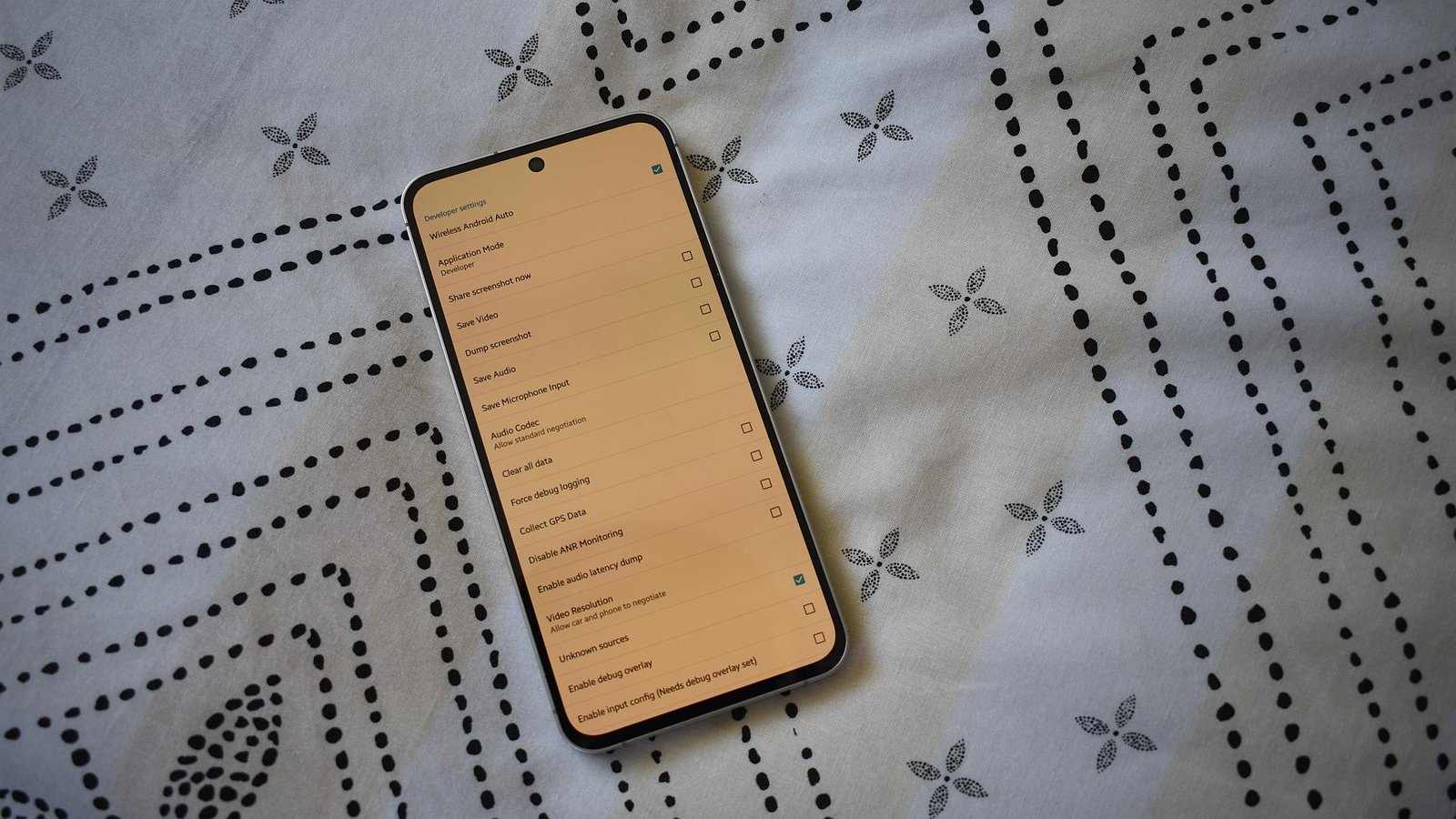
    Once you land on the Android Auto settings screen, scroll down to the “About” section. Tap the “Version” entry multiple times—about ten taps should suffice. Soon, a pop-up message will confirm you’ve enabled development settings, which you can access through the three-dot menu on the settings screen.

    This developer mode includes two main features worth noting: Wireless Android Auto and Unknown Sources. The former allows you to connect your phone without a cable, which enhances convenience. If you frequently use a wireless setup, you’ll want to keep this option enabled. Alternatively, if you’re still using a cable, you can disable it to prevent unnecessary connections.

    The Unknown Sources option unlocks apps not downloaded from the Google Play Store. If you enjoy third-party applications, this setting is crucial, as it enables access to various services that might not otherwise appear on your dashboard.

    Despite its potential, not everyone needs to enable developer mode. If you primarily stick to apps from the Play Store or prefer a wired connection, you may find little benefit in unlocking these settings.

    Ultimately, evaluate your habits and needs as a driver. The smart features of Android Auto can enhance urban driving experiences, especially as cities incorporate more technology. However, weigh the pros and cons before diving into the developer options. Your driving experience could become smarter and more efficient, but it’s up to you to decide if that’s worth the effort.

    Discover More Technology Insights

    Explore the future of technology with our detailed insights on Artificial Intelligence.

    Stay inspired by the vast knowledge available on Wikipedia.

    GadgetsV1

    android Android Auto apple cell google iOS mobile VT1
    Share. Facebook Twitter Pinterest LinkedIn Tumblr Email
    Previous ArticleRevolutionary Brain Imaging Unlocks Parkinson’s Clues
    Next Article iPhone 17 Resellers See Spike in Bulk Trades!
    Avatar photo
    Lina Johnson Mercilli
    • Website

    Lina Johnson Marcelli is the editor for IO Tribune, bringing over two decades of experience in journalism to her role. With a BA in Journalism, she is passionate about delivering impactful stories that resonate with readers. Known for her keen editorial vision and leadership, Lina is dedicated to fostering innovative storytelling across the publication. Outside of work, she enjoys exploring new media trends and mentoring aspiring journalists.

    Related Posts

    Crypto

    ZachXBT’s Bombshell Claims Crash LAB 30%+ in a Day

    May 16, 2026
    AI

    Mira Murati: AI Must Keep Humans Involved

    May 15, 2026
    Gadgets

    Marathon’s Future: Duo Queues, New PvE Modes & Improved Onboarding

    May 15, 2026
    Add A Comment

    Comments are closed.

    Must Read

    ZachXBT’s Bombshell Claims Crash LAB 30%+ in a Day

    May 16, 2026

    Mira Murati: AI Must Keep Humans Involved

    May 15, 2026

    Marathon’s Future: Duo Queues, New PvE Modes & Improved Onboarding

    May 15, 2026

    Alibaba and Tencent’s contrasting AI investment strategies Revealed

    May 15, 2026

    Genmab Withdraws Two Antibody Assets, Includes ProfoundBio ADC

    May 15, 2026
    Categories
    • AI
    • Crypto
    • Fashion Tech
    • Gadgets
    • IOT
    • OPED
    • Quantum
    • Science
    • Smart Cities
    • Space
    • Tech
    • Technology
    Most Popular

    Breaking: One UI 7 Update Suspended Globally (Update: Why?)

    April 14, 2025

    Maple Syrup: Nature’s Sweet Superfood Unveiled!

    June 7, 2025

    Embryo Revolution: The Fold that Shaped Evolution

    September 5, 2025
    Our Picks

    Maximize Verizon’s Streaming Perks for Netflix, HBO Max, and More!

    December 19, 2025

    Meet Lara Ozkan: The Trailblazing 2025 Marshall Scholar Shining Bright at MIT!

    March 14, 2025

    NASA’s High-Tech Tools Unravel the Secrets of California Wildfires

    March 1, 2025
    Categories
    • AI
    • Crypto
    • Fashion Tech
    • Gadgets
    • IOT
    • OPED
    • Quantum
    • Science
    • Smart Cities
    • Space
    • Tech
    • Technology
    • Privacy Policy
    • Disclaimer
    • Terms and Conditions
    • About Us
    • Contact us
    Copyright © 2025 Iotribune.comAll Rights Reserved.

    Type above and press Enter to search. Press Esc to cancel.