

Essential Insights
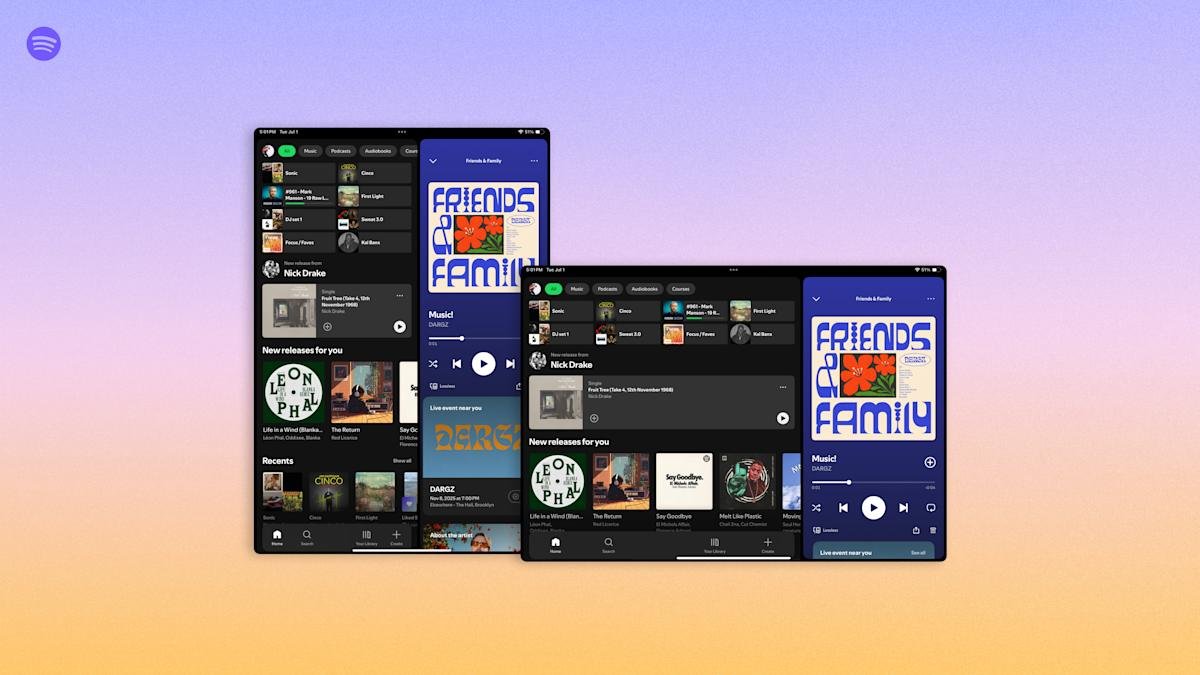
- Spotify’s new tablet UI offers adaptive orientation, seamlessly switching between portrait and landscape modes.
- The app now features a collapsible sidebar, maximizing screen space for videos and podcasts.
- Parallel browsing allows users to scroll through content while watching videos or viewing lyrics sidebar.
- The “switch to video” toggle is now more prominent, enhancing user convenience; rolling out on iPad and Android today.
Spotify introduces a fresh look for tablet users today. The updated design offers a more flexible experience, adapting to how users hold their devices. Unlike before, the interface now smoothly switches between portrait and landscape modes. This change makes navigation easier and more natural on larger screens.
Additionally,Spotify added a collapsible sidebar. This feature allows listeners to enjoy more screen space, especially when watching videos or podcasts. Users can browse through content while videos or lyrics stay visible in the sidebar. Furthermore, the “switch to video” button is now more noticeable, making it simpler to switch between formats.
This new user interface had already been tested with some users earlier this year. Today, the final version begins rolling out for both iPad and Android tablets. The update improves usability and enhances the overall listening experience.
Smart cities rely on innovations like these to improve connectivity and user engagement. For example, making apps more adaptable on various devices helps create a seamless digital environment. As technology advances, such features are crucial for making urban life more efficient and enjoyable. Smartphone and tablet updates like this demonstrate how digital tools can better serve people and enhance urban living.
Discover More Technology Insights
Learn how the Internet of Things (IoT) is transforming everyday life.
Stay inspired by the vast knowledge available on Wikipedia.
GadgetsV1
