
Close Menu
    Facebook X (Twitter) Instagram
    Sunday, September 6
    Top Stories:
    • ByteDance Plans Massive Inner Mongolia AI Data Center Expansion
    • Stanford Scientists Discover Seafood That Reverses Signs of Aging
    • Are Z.ai and MiniMax Diverging Financial Paths After Hong Kong IPOs?
    Facebook X (Twitter) Instagram Pinterest Vimeo
    IO Tribune
    • Home
    • AI
    • Tech
      • Gadgets
      • Fashion Tech
    • Crypto
    • Smart Cities
      • IOT
    • Science
      • Space
      • Quantum
    • OPED
    IO Tribune
    Home » App Alerts You to Nearby Smart Glasses!
    Gadgets

    App Alerts You to Nearby Smart Glasses!

    Lina Johnson MercilliBy Lina Johnson MercilliFebruary 25, 2026No Comments2 Mins Read
    Share Facebook Twitter Pinterest LinkedIn Tumblr Reddit Telegram Email
    Share
    Facebook Twitter LinkedIn Pinterest Email

    Fast Facts

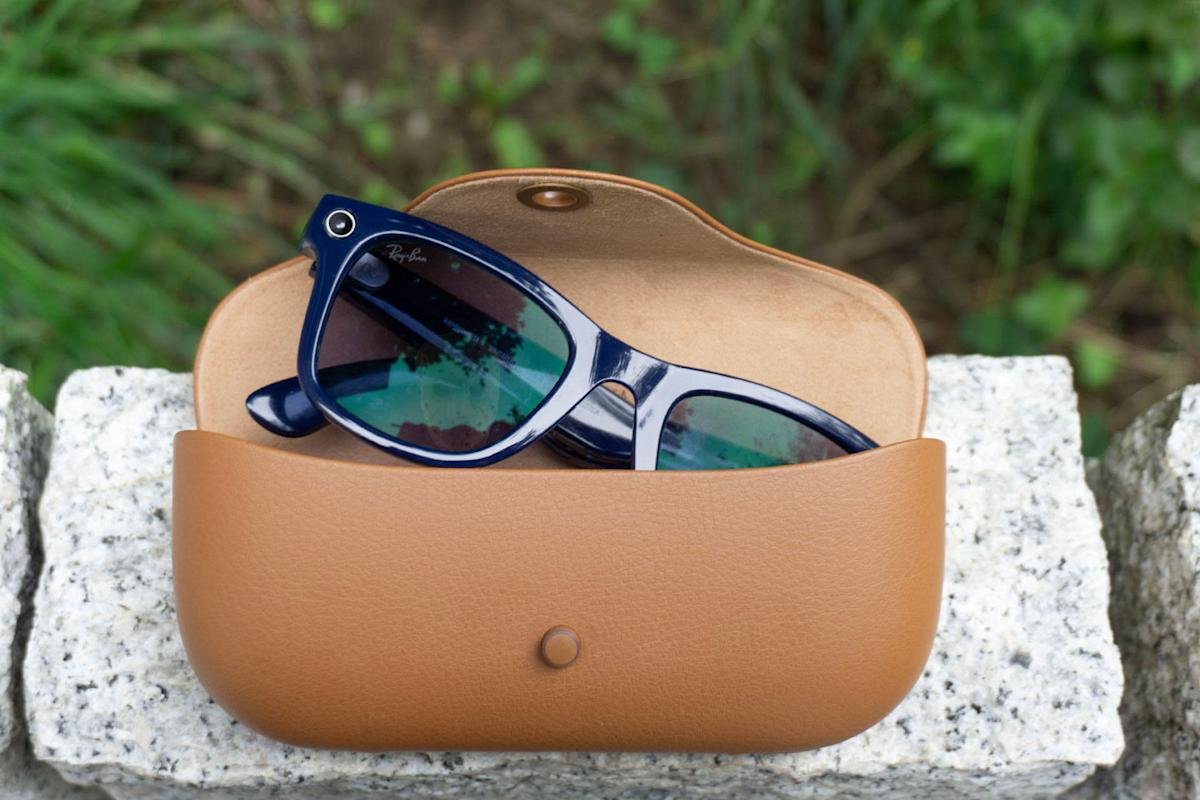
    1. Privacy Protection: Nearby Glasses app alerts users if smart glasses, like Meta’s Ray-Bans, are detected nearby, addressing surveillance concerns.

    2. Bluetooth Detection: The app works by recognizing the unique Bluetooth signature of smart glasses, providing notifications about potential privacy invasions.

    3. Developer’s Perspective: Yves Jeanrenaud, the app’s creator, views it as a small act of resistance against rising surveillance technology.

    4. Availability: Nearby Glasses can be downloaded from the Google Play Store and GitHub, though it may trigger false positives from devices like VR headsets.

    New App Alerts Users to Nearby Smart Glasses

    A new app aims to enhance privacy in public spaces. Named Nearby Glasses, it alerts users when smart glasses are likely nearby. The app emerged following media reports highlighting potential misuse of devices like Meta’s Ray-Bans.

    These smart glasses can film individuals without their knowledge, raising privacy concerns. Yves Jeanrenaud, the app’s developer, sees it as a small act of resistance against surveillance technology. He emphasizes that individuals should feel safe in their communities.

    Nearby Glasses works by detecting the unique Bluetooth signature emitted by smart glasses. When the app identifies a nearby device, it sends a push notification to users. This feature seeks to empower consumers by promoting awareness of their surroundings.

    However, users should note that false positives can occur. Other devices, like VR headsets, may trigger alerts. Despite this, the app serves as a proactive tool for privacy-conscious individuals.

    The rise of smart glasses presents both opportunities and challenges for urban life. As technology advances, cities face new privacy dilemmas. Nearby Glasses provides a way for residents to navigate this evolving landscape, ensuring awareness and enhancing public discourse around surveillance.

    Currently, Nearby Glasses is available on the Google Play Store and GitHub. As discussions about privacy continue, this app may shape the future of how we interact with emerging technologies.

    Expand Your Tech Knowledge

    Learn how the Internet of Things (IoT) is transforming everyday life.

    Explore past and present digital transformations on the Internet Archive.

    GadgetsV1

    404 Media android apple cell google iOS media coverage mobile smart glasses VT1
    Share. Facebook Twitter Pinterest LinkedIn Tumblr Email
    Previous ArticleDJI Takes Legal Action Against FCC Drone Import Ban
    Next Article Unveiling the Latest: Design, Upgrades, Price, and More!
    Avatar photo
    Lina Johnson Mercilli
    • Website

    Lina Johnson Marcelli is the editor for IO Tribune, bringing over two decades of experience in journalism to her role. With a BA in Journalism, she is passionate about delivering impactful stories that resonate with readers. Known for her keen editorial vision and leadership, Lina is dedicated to fostering innovative storytelling across the publication. Outside of work, she enjoys exploring new media trends and mentoring aspiring journalists.

    Related Posts

    AI

    AI Controls Fusion Plasma Faster Than Humans

    September 6, 2026
    Space

    Shadow Pursuit: The 2026 Eclipse Awakens Wonders

    September 6, 2026
    AI

    RAG Must Show Four Evidence Types When “Not in Document”

    September 6, 2026
    Add A Comment

    Comments are closed.

    Must Read

    AI Controls Fusion Plasma Faster Than Humans

    September 6, 2026

    Shadow Pursuit: The 2026 Eclipse Awakens Wonders

    September 6, 2026

    RAG Must Show Four Evidence Types When “Not in Document”

    September 6, 2026

    Neutrino laser impossible, new research reveals

    September 6, 2026

    Here are some engaging, SEO-friendly alternatives to “Broad and Intriguing”:

    • Exploring Broad and Intriguing Ideas That Spark Curiosity
    • A Fascinating Look at Broad and Intriguing Topics
    • Broad, Intriguing Insights You Won’t Want to Miss
    • Discover the Most Broad and Intriguing Perspectives
    • Uncovering Broad and Intriguing Ideas for Curious Minds

    Best all-purpose option:
    Exploring Broad and Intriguing Ideas That Spark Curiosity

    September 6, 2026
    Categories
    • AI
    • Crypto
    • Fashion Tech
    • Gadgets
    • IOT
    • OPED
    • Quantum
    • Science
    • Smart Cities
    • Space
    • Tech
    Most Popular

    Mastering Pi Network: When to Buy with ChatGPT

    June 21, 2025

    Unlocking Perfect Sleep: Stop Worrying!

    June 2, 2026

    Little Pepe Rakes in $10M+ in Ethereum Layer 2 Presale!

    July 21, 2025
    Our Picks

    Is One Satellite Service Truly Superior?

    August 10, 2025

    China Greenlights Two Advanced Level-3 Autonomous EVs

    December 16, 2025

    Galaxy A57 Model Numbers Discovered on Samsung Servers

    November 1, 2025
    Categories
    • AI
    • Crypto
    • Fashion Tech
    • Gadgets
    • IOT
    • OPED
    • Quantum
    • Science
    • Smart Cities
    • Space
    • Tech
    • Privacy Policy
    • Disclaimer
    • Terms and Conditions
    • About Us
    • Contact us
    Copyright © 2025 Iotribune.comAll Rights Reserved.

    Type above and press Enter to search. Press Esc to cancel.