
Close Menu
    Facebook X (Twitter) Instagram
    Sunday, May 17
    Top Stories:
    • Ebola Outbreak Kills 87 in Democratic Republic of Congo
    • Kindle Jailbreak: Users Revive Older Devices as Support Ends
    • Navigating Life in a Tech-Overloaded World
    Facebook X (Twitter) Instagram Pinterest Vimeo
    IO Tribune
    • Home
    • AI
    • Tech
      • Gadgets
      • Fashion Tech
    • Crypto
    • Smart Cities
      • IOT
    • Science
      • Space
      • Quantum
    • OPED
    IO Tribune
    Home » Activate Auto Dark Mode on Android with This Brilliant App!
    Gadgets

    Activate Auto Dark Mode on Android with This Brilliant App!

    Lina Johnson MercilliBy Lina Johnson MercilliMarch 22, 2026No Comments2 Mins Read
    Share Facebook Twitter Pinterest LinkedIn Tumblr Reddit Telegram Email
    Share
    Facebook Twitter LinkedIn Pinterest Email

    Top Highlights

    1. Adaptive Theme automatically switches between dark and light modes based on ambient light, providing a seamless, sensor-driven user experience without manual toggling.
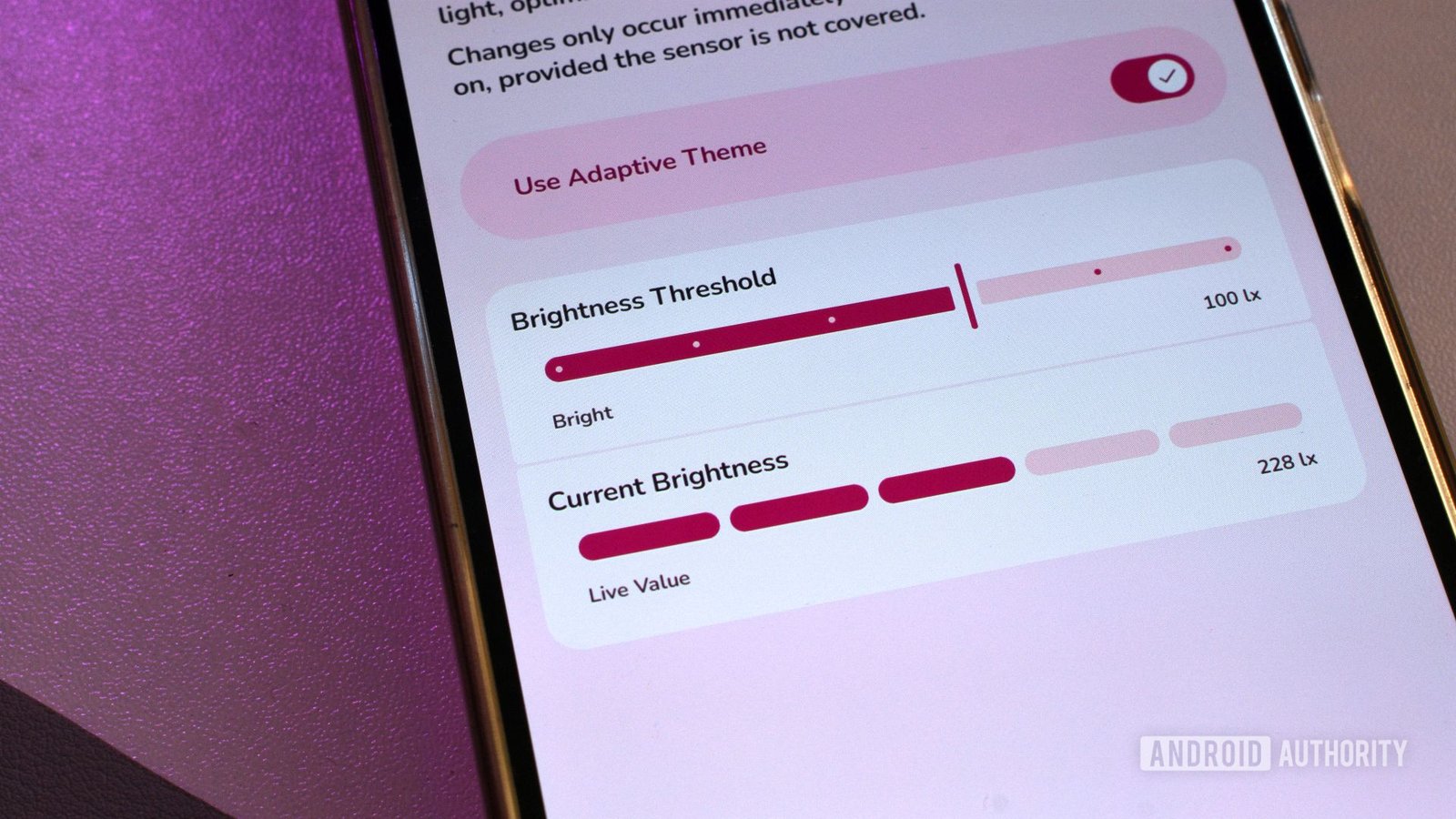
    2. Users can customize the light threshold for mode switching, using one of six preset levels or a specific lux value, with real-time sensor readings aiding fine-tuning.
    3. The app requires access to advanced Android features via Shizuku, making setup complex but enabling automatic theme adjustments without rooting the device.
    4. Despite its limitations—such as only switching after unlocking—it offers a practical, almost essential enhancement that Android has yet to integrate natively.

    Android users can now enjoy auto dark mode capabilities thanks to a new app called Adaptive Theme. While Android doesn’t natively support automatic switching between light and dark modes based on surroundings, this app fills that gap. It uses the phone’s ambient light sensor to detect changes in brightness and adjusts the theme accordingly. So, whether you’re outdoors in bright sunlight or indoors in low light, your screen adapts seamlessly.

    This innovation is especially helpful for reducing eye strain and saving battery life. For example, the app automatically switches to dark mode in dim settings, protecting your retinas and extending your device’s battery. The user can also choose specific light levels—called thresholds—that trigger the change. This makes the app customizable for different preferences and lighting conditions.

    Although setting up Adaptive Theme requires some trial and error, its simple design makes it accessible. It only needs a few taps to enable automatic switching, and users can see real-time light readings to find their preferred settings. Additionally, it works without rooting the device by using a third-party app called Shizuku, which grants apps access to restricted features. However, this adds some complexity to the setup process.

    The app’s capabilities highlight how smart technology improves daily life. As urban environments grow more connected and responsive, features like adaptive dark mode demonstrate the potential for cities to become more user-friendly. By integrating such smart apps, cities can become more efficient and environmentally conscious—saving energy, enhancing comfort, and promoting healthier lifestyles. Despite some limitations, Adaptive Theme represents an exciting step forward for Android users seeking personalized, eco-friendly tech solutions.

    Discover More Technology Insights

    Learn how the Internet of Things (IoT) is transforming everyday life.

    Discover archived knowledge and digital history on the Internet Archive.

    GadgetsV1

    android Android apps apple cell google iOS mobile VT1
    Share. Facebook Twitter Pinterest LinkedIn Tumblr Email
    Previous ArticleQ2’s Top Altcoin: 2 AIs Predict the Winner
    Next Article Master Prompt Caching with OpenAI API: Quick Python Guide
    Avatar photo
    Lina Johnson Mercilli
    • Website

    Lina Johnson Marcelli is the editor for IO Tribune, bringing over two decades of experience in journalism to her role. With a BA in Journalism, she is passionate about delivering impactful stories that resonate with readers. Known for her keen editorial vision and leadership, Lina is dedicated to fostering innovative storytelling across the publication. Outside of work, she enjoys exploring new media trends and mentoring aspiring journalists.

    Related Posts

    Crypto

    Will XRP Surge After CLARITY Act Pass?

    May 17, 2026
    AI

    CodeSpeak Takes Over My Repository

    May 17, 2026
    AI

    OpenAI’s Surprising 131K-GPU Training Network

    May 17, 2026
    Add A Comment

    Comments are closed.

    Must Read

    Will XRP Surge After CLARITY Act Pass?

    May 17, 2026

    CodeSpeak Takes Over My Repository

    May 17, 2026

    OpenAI’s Surprising 131K-GPU Training Network

    May 17, 2026

    OnePlus Halts OxygenOS Updates: What You Need to Know

    May 17, 2026

    Can Virtual Worlds Defy Physics? Discovering Reality in a Whole New Dimension!

    May 17, 2026
    Categories
    • AI
    • Crypto
    • Fashion Tech
    • Gadgets
    • IOT
    • OPED
    • Quantum
    • Science
    • Smart Cities
    • Space
    • Tech
    • Technology
    Most Popular

    Will BTC Fall Below $60K?

    February 19, 2026

    Apollo Discoveries: Moon’s Surprising Super-Magnetism Unveiled!

    February 27, 2026

    Russia-Linked Crypto Activity Fuels Record Illicit Wallet Inflows in 2025: TRM Labs

    February 1, 2026
    Our Picks

    Bitcoin’s Moment? Gold’s Cooldown Opens Crypto Door

    January 5, 2026

    Unveiling the Universe: Discovering Cosmic Voids with NASA’s Telescope

    December 15, 2025

    Struggling with Android Beta Signup? Here’s the Likely Cause!

    April 20, 2026
    Categories
    • AI
    • Crypto
    • Fashion Tech
    • Gadgets
    • IOT
    • OPED
    • Quantum
    • Science
    • Smart Cities
    • Space
    • Tech
    • Technology
    • Privacy Policy
    • Disclaimer
    • Terms and Conditions
    • About Us
    • Contact us
    Copyright © 2025 Iotribune.comAll Rights Reserved.

    Type above and press Enter to search. Press Esc to cancel.