
Close Menu
    Facebook X (Twitter) Instagram
    Wednesday, April 15
    Top Stories:
    • FCC’s Decision Paves the Way for Netgear’s Router Monopoly
    • Privacy Advocates Urge Google to Protect Consumer Data from ICE
    • Score Big Savings: QC Ultra Earbuds Now 20% Off!
    Facebook X (Twitter) Instagram Pinterest Vimeo
    IO Tribune
    • Home
    • AI
    • Tech
      • Gadgets
      • Fashion Tech
    • Crypto
    • Smart Cities
      • IOT
    • Science
      • Space
      • Quantum
    • OPED
    IO Tribune
    Home » Troubleshoot Your Phone’s Hotspot Issues
    IOT

    Troubleshoot Your Phone’s Hotspot Issues

    Staff ReporterBy Staff ReporterJuly 3, 2025No Comments3 Mins Read
    Share Facebook Twitter Pinterest LinkedIn Tumblr Reddit Telegram Email
    Share
    Facebook Twitter LinkedIn Pinterest Email

    Top Highlights

    1. Utilize Your Personal Hotspot: Your phone’s hotspot can provide internet access when home Wi-Fi is down or unavailable, by sharing your cellular data with other devices.

    2. Troubleshooting Steps for iPhone: Ensure the hotspot is enabled in Settings, restart both devices, update iOS, reset network settings, and check the Wi-Fi password if connection issues occur.

    3. Troubleshooting Steps for Android: Confirm hotspot settings are correct, restart the device, reset network settings if needed, and boot into safe mode to troubleshoot potential app conflicts.

    4. Carrier Support: If problems persist, contact your carrier to check for network issues, especially if considering using a personal hotspot as a primary internet source.

    iPhone Hotspot Troubleshooting

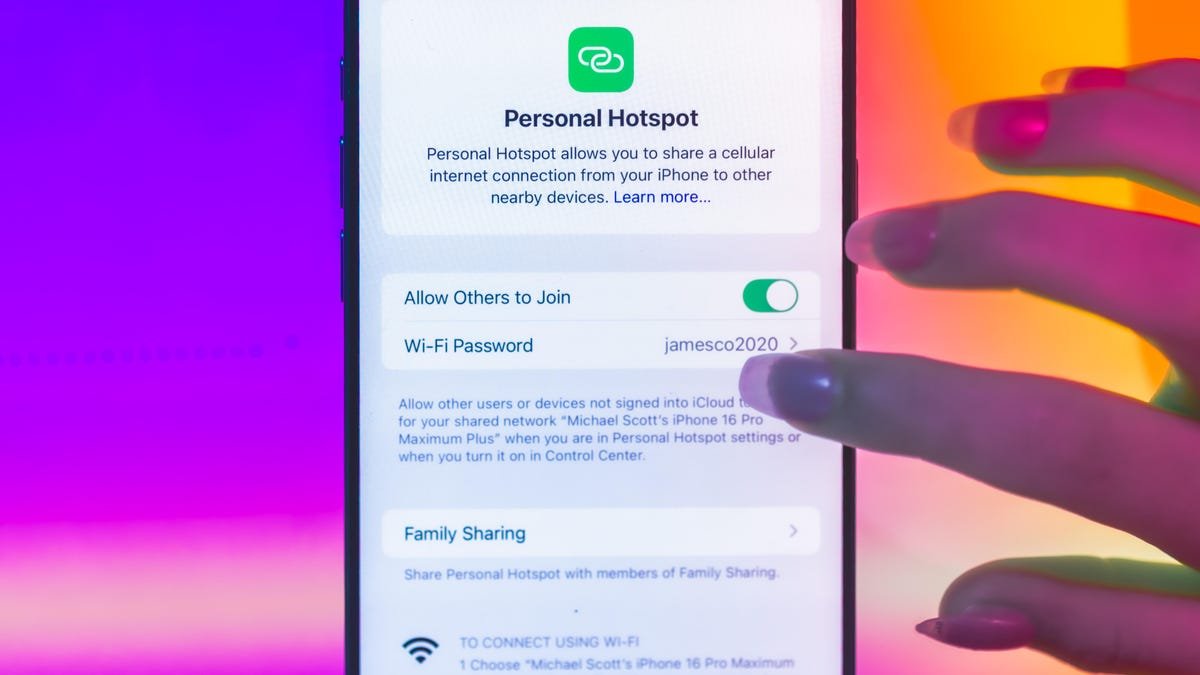
    Your iPhone’s personal hotspot can be a lifesaver during internet outages. If it stops working, start by checking if the hotspot is enabled. Go to Settings, then tap on Personal Hotspot. If you can’t find the option, contact your carrier to confirm that your plan includes this feature.

    Next, restart both your iPhone and the device you want to connect. Updating to the latest version of iOS often resolves issues, too. Consider resetting your network settings. Navigate to Settings, tap General, and select Transfer or Reset iPhone. From there, tap Reset and choose Reset Network Settings. Be aware that this will erase all previously stored Wi-Fi networks and passwords. If you connect via Wi-Fi, ensure “Allow Others to Join” is enabled. For recent iPhones, toggle the “Maximize Compatibility” switch. This option enables a slower connection that broadens compatibility with other devices.

    Android Hotspot Solutions

    For Android users, begin by confirming that the hotspot is enabled. Go to Settings, then Network & Internet, and check the Hotspot & Tethering section. Toggle on Mobile Hotspot or Tethering. Ensure your security settings, password, and network name are correct.

    Rebooting your device can solve many issues. If problems persist, reset your network settings by going to System, tapping Reset, and selecting Reset Wi-Fi, mobile & Bluetooth. Keep in mind that this will erase your Bluetooth and Wi-Fi settings.

    Alternatively, booting your phone into safe mode can identify if a third-party app is causing the issue. If these steps do not work, check for data connectivity issues in your area. Contact your carrier for assistance if necessary. Using a personal hotspot can be convenient, but it may not fully replace home Wi-Fi for all needs.

    Stay Ahead with the Latest Tech Trends

    Dive deeper into the world of Space and its vast mysteries.

    Learn more about cutting-edge innovations supported by the National Science Foundation (NSF).

    IoTV1

    5G Connected Cities IOT Smart Cities VT1
    Share. Facebook Twitter Pinterest LinkedIn Tumblr Email
    Previous ArticleStripe’s First Employee Acquires a Bank: A Fintech Visionary’s Next Move
    Next Article Unleashing the Essence: I Am Artemis
    Avatar photo
    Staff Reporter
    • Website

    John Marcelli is a staff writer for IO Tribune, with a passion for exploring and writing about the ever-evolving world of technology. From emerging trends to in-depth reviews of the latest gadgets, John stays at the forefront of innovation, delivering engaging content that informs and inspires readers. When he's not writing, he enjoys experimenting with new tech tools and diving into the digital landscape.

    Related Posts

    AI

    Gemini ER 1.6: Boosted Embodied Reasoning by Google DeepMind

    April 15, 2026
    Crypto

    STRC Stock Soars to $1.1B Daily Volume Record!

    April 14, 2026
    Tech

    FCC’s Decision Paves the Way for Netgear’s Router Monopoly

    April 14, 2026
    Add A Comment

    Comments are closed.

    Must Read

    Gemini ER 1.6: Boosted Embodied Reasoning by Google DeepMind

    April 15, 2026

    STRC Stock Soars to $1.1B Daily Volume Record!

    April 14, 2026

    FCC’s Decision Paves the Way for Netgear’s Router Monopoly

    April 14, 2026

    Embracing the Essence of Belonging

    April 14, 2026

    Shaping Tomorrow’s Software Today

    April 14, 2026
    Categories
    • AI
    • Crypto
    • Fashion Tech
    • Gadgets
    • IOT
    • OPED
    • Quantum
    • Science
    • Smart Cities
    • Space
    • Tech
    • Technology
    Most Popular

    Cracking the Code: Scientists Perfect Cacio e Pepe!

    September 20, 2025

    Bambu Labs Unveils Eco-Friendly 3D-Printable Toys with Reusable Tech

    March 17, 2025

    DOJ’s Google Proposal Threatens User Trust, Search Chief Warns

    May 6, 2025
    Our Picks

    Seventeen and Brilliant: Hannah Cairo’s Math Breakthrough

    August 2, 2025

    Predator Robots Reveal How Larval Zebrafish Learn Rapidly

    February 23, 2025

    Obsessed with Apple’s Sleek New iPhone Air!

    September 9, 2025
    Categories
    • AI
    • Crypto
    • Fashion Tech
    • Gadgets
    • IOT
    • OPED
    • Quantum
    • Science
    • Smart Cities
    • Space
    • Tech
    • Technology
    • Privacy Policy
    • Disclaimer
    • Terms and Conditions
    • About Us
    • Contact us
    Copyright © 2025 Iotribune.comAll Rights Reserved.

    Type above and press Enter to search. Press Esc to cancel.