
Close Menu
    Facebook X (Twitter) Instagram
    Saturday, August 1
    Top Stories:
    • Rivian’s E-Bike Revolution: Deliveries Finally Underway!
    • RedNote Eyes US$2.2B Data Center as China Boosts AI Infrastructure
    • Unveiled: The True Secret Behind Queen Bee Creation
    Facebook X (Twitter) Instagram Pinterest Vimeo
    IO Tribune
    • Home
    • AI
    • Tech
      • Gadgets
      • Fashion Tech
    • Crypto
    • Smart Cities
      • IOT
    • Science
      • Space
      • Quantum
    • OPED
    IO Tribune
    Home » Stretch Your Lock Screen Clock in iOS 26
    Gadgets

    Stretch Your Lock Screen Clock in iOS 26

    Lina Johnson MercilliBy Lina Johnson MercilliNovember 9, 2025No Comments3 Mins Read
    Share Facebook Twitter Pinterest LinkedIn Tumblr Reddit Telegram Email
    Share
    Facebook Twitter LinkedIn Pinterest Email

    Top Highlights

    1. Creative Freedom: iOS 26 introduces a customizable lock screen feature that allows users to stretch the clock, providing a bold and modern look tailored to personal preferences.

    2. Adaptive Time: The new “adaptive time” feature transforms the clock from a static element to a fluid one, enhancing the overall lock screen experience with dynamic resizing.

    3. User-Friendly Process: By entering customization mode and using a simple drag handle, users can easily adjust the clock’s size, with options for both dramatic expansions and minimalist looks.

    4. Visual Impact Considerations: The effectiveness of the stretched clock varies with wallpaper choice; simpler backgrounds enhance visibility, while complex images may hinder the feature’s aesthetic appeal.

    Stretch the Clock on Your Lock Screen in iOS 26

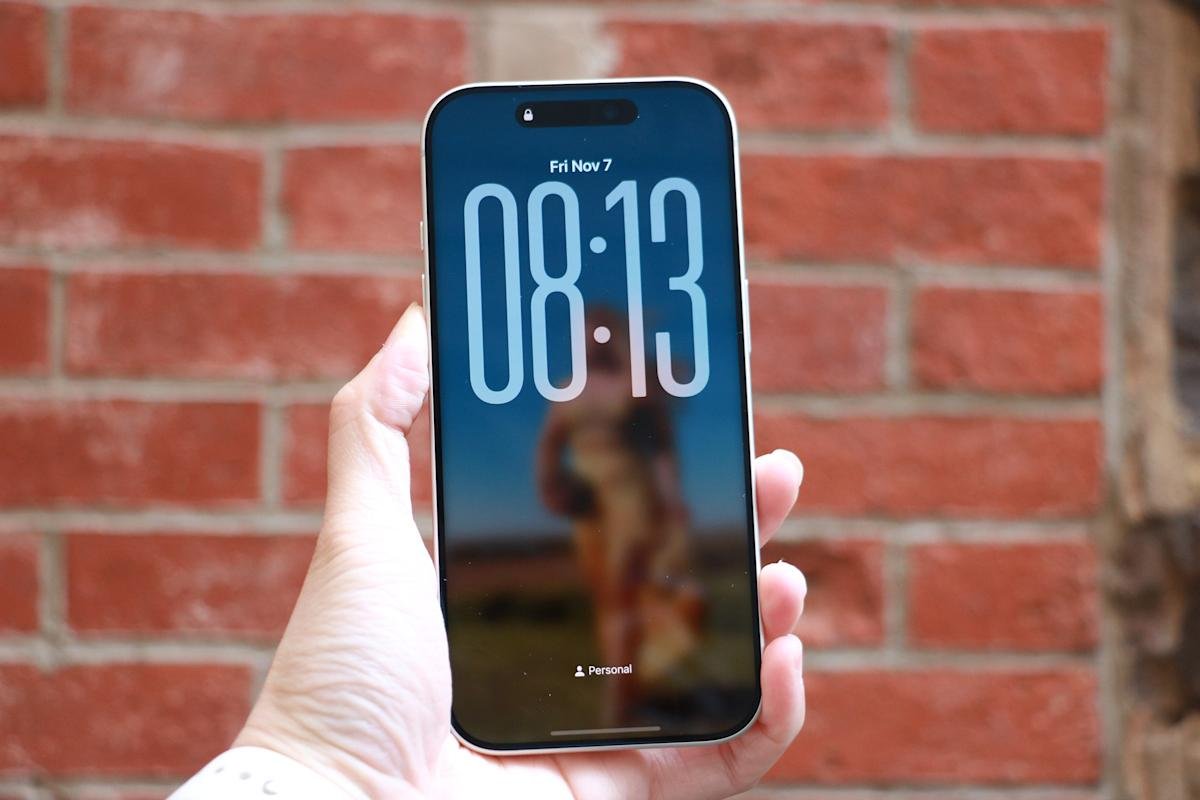
    Apple continues to enhance user customization in iOS 26, introducing a striking feature: the ability to stretch the clock on your lock screen. This new option invites creativity, allowing for a bold or minimalist look based on personal preference.

    To access this feature, wake your iPhone and press anywhere on the lock screen to enter customization mode. Here, you’ll see a carousel of saved lock screens. Simply tap “Customize” and then “Lock Screen” to enter the editor.

    Next, tap the clock. You’ll see a familiar font and color panel. Ensure you select the default font, which aligns with the Arabic Western script. This step is crucial; if set up correctly, a small drag handle will appear at the lower-right corner of the clock.

    By dragging this handle downward, users can expand the clock in real time. When satisfied with the size, tap “Done” to save your new look. Exiting customization mode reveals your refreshed lock screen.

    Nevertheless, some limitations exist. The stretch function only activates with the default font. If you apply custom styles, the handle won’t appear. Similarly, widgets beneath the clock can interfere, so removing them might help.

    The stretched clock effect pairs beautifully with Apple’s new Liquid Glass interface. This design enhances visual depth, giving the appearance of floating numerals. Also, simpler wallpapers allow for more impactful clock resizing, while busy backgrounds can detract from the effect.

    Ultimately, the stretched clock feature contributes to iOS’s broader personalization trend. Users now enjoy advanced tools for widgets, depth-aware wallpapers, and more, elevating the lock screen experience. The process is quick and reversible, encouraging experimentation with different styles.

    In essence, this feature exemplifies Apple’s commitment to allowing users to personalize their devices like never before. The result? An engaging lock screen that reflects your unique taste.

    Continue Your Tech Journey

    Learn how the Internet of Things (IoT) is transforming everyday life.

    Discover archived knowledge and digital history on the Internet Archive.

    GadgetsV1

    android apple cell customization options google iOS lock screen lock screens mobile screen VT1
    Share. Facebook Twitter Pinterest LinkedIn Tumblr Email
    Previous ArticleApple Watch SE 3 Now Just $200—Grab It Before Black Friday!
    Next Article Unveiling the Cosmos: NASA’s Bold Step into the Unknown
    Avatar photo
    Lina Johnson Mercilli
    • Website

    Lina Johnson Marcelli is the editor for IO Tribune, bringing over two decades of experience in journalism to her role. With a BA in Journalism, she is passionate about delivering impactful stories that resonate with readers. Known for her keen editorial vision and leadership, Lina is dedicated to fostering innovative storytelling across the publication. Outside of work, she enjoys exploring new media trends and mentoring aspiring journalists.

    Related Posts

    AI

    AI Helper Bids to Fix Your Boyfriend’s Flaws

    August 1, 2026
    Tech

    Rivian’s E-Bike Revolution: Deliveries Finally Underway!

    July 31, 2026
    Tech

    RedNote Eyes US$2.2B Data Center as China Boosts AI Infrastructure

    July 31, 2026
    Add A Comment

    Comments are closed.

    Must Read

    AI Helper Bids to Fix Your Boyfriend’s Flaws

    August 1, 2026

    Rivian’s E-Bike Revolution: Deliveries Finally Underway!

    July 31, 2026

    RedNote Eyes US$2.2B Data Center as China Boosts AI Infrastructure

    July 31, 2026

    Unveiled: The True Secret Behind Queen Bee Creation

    July 31, 2026

    Bezel-Less Brilliance: Tecno’s Stunning Concept Phone Revealed!

    July 31, 2026
    Categories
    • AI
    • Crypto
    • Fashion Tech
    • Gadgets
    • IOT
    • OPED
    • Quantum
    • Science
    • Smart Cities
    • Space
    • Tech
    Most Popular

    Shiba Inu Meme Coin Dips as OKX Exits: What You Need to Know

    July 1, 2025

    Ready for Supersonic: The X-59 Takes to the Skies!

    May 29, 2026

    ZKsync Creator Cuts Jobs, Shifts to Privacy Chain

    June 18, 2026
    Our Picks

    Mini Marvel: Boox Picco E-Reader Beckons!

    July 24, 2026

    Did Coinbase Cause ICP’s 10% Drop?

    May 14, 2026

    Waymo Expands: Robotaxis Set to Transform Three New Cities!

    November 3, 2025
    Categories
    • AI
    • Crypto
    • Fashion Tech
    • Gadgets
    • IOT
    • OPED
    • Quantum
    • Science
    • Smart Cities
    • Space
    • Tech
    • Privacy Policy
    • Disclaimer
    • Terms and Conditions
    • About Us
    • Contact us
    Copyright © 2025 Iotribune.comAll Rights Reserved.

    Type above and press Enter to search. Press Esc to cancel.