
Close Menu
    Facebook X (Twitter) Instagram
    Friday, April 17
    Top Stories:
    • Success Redefined: Warren Buffett’s Love-Driven Philosophy
    • Sustainability: Accelerating Maturity
    • Pleasures or Ploys?
    Facebook X (Twitter) Instagram Pinterest Vimeo
    IO Tribune
    • Home
    • AI
    • Tech
      • Gadgets
      • Fashion Tech
    • Crypto
    • Smart Cities
      • IOT
    • Science
      • Space
      • Quantum
    • OPED
    IO Tribune
    Home » Maximize Accessibility Reader on Apple Devices
    Gadgets

    Maximize Accessibility Reader on Apple Devices

    Lina Johnson MercilliBy Lina Johnson MercilliDecember 4, 2025No Comments3 Mins Read
    Share Facebook Twitter Pinterest LinkedIn Tumblr Reddit Telegram Email
    Share
    Facebook Twitter LinkedIn Pinterest Email

    Summary Points

    1. Launch of Accessibility Reader: Apple introduced Accessibility Reader, a tool for easier reading on devices, designed specifically for individuals with visual disabilities, available on iPhone, iPad, Mac, and Vision Pro.

    2. Activation Process: Users can activate Accessibility Reader through Settings > Accessibility > Read & Speak, with multiple launch options like the Accessibility Shortcut, Control Center, and keyboard shortcuts for Mac.

    3. Text-to-Speech Functionality: The feature includes a text-to-speech option, allowing users to listen to on-screen text with playback controls and speed adjustments.

    4. Customization Options: Accessibility Reader offers extensive customization, enabling users to modify font size, color, theme, and line spacing through an intuitive settings menu.

    Apple’s Accessibility Reader: A Tool for Everyone

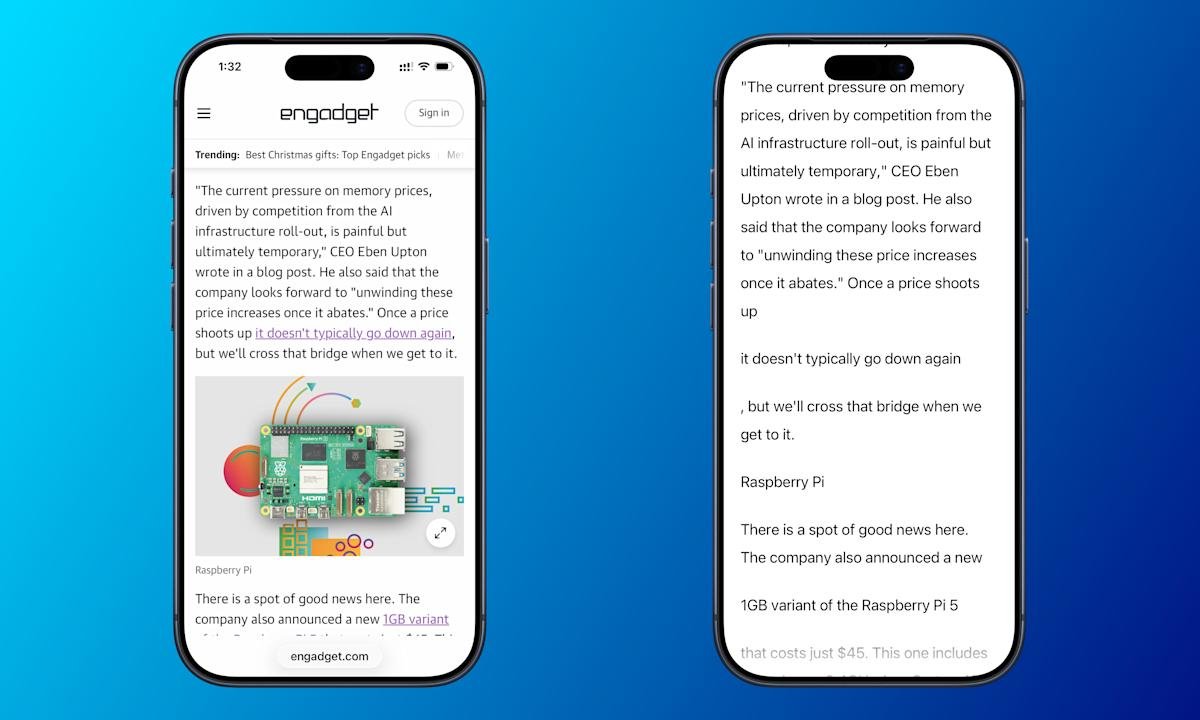
    Earlier this year, Apple introduced an exciting feature called Accessibility Reader. Designed primarily for people with visual disabilities, this tool enhances screen readability across any app. It offers a full-screen view of text and even reads the content aloud. Thus, it empowers users to interact more easily with their devices.

    To get started, ensure your device runs on iOS 26, iPadOS 26, macOS 26 Tahoe, or visionOS 26. Activating Accessibility Reader is simple. First, navigate to Settings, then Accessibility, and finally Read & Speak. Toggle Accessibility Reader on at the top of the menu.

    Next, you can launch the tool through various methods. For iPhone, iPad, and Vision Pro users, the Accessibility Shortcut allows you to triple-click the lock button. This brings up a quick-launch menu. If you prefer a cleaner shortcut, remove other items in Settings under Accessibility Shortcut.

    Alternatively, you can add an icon in Control Center. Just swipe down from the top-right corner and select “Add a Control.” Look for the Accessibility Reader option and tap it whenever you need instant access.

    For Mac users, the default launch shortcut is Cmd-Esc. You can also use the Accessibility Shortcut menu, activated by pressing Opt-Cmd-F5 or tapping Touch ID three times. This versatility makes it easy for users to choose their preferred method.

    Once you launch Accessibility Reader, listening to text is straightforward. Press the play button to begin. You can pause or skip sections with simple controls. Moreover, you can adjust the reading speed using the speed setting.

    Customization enhances the reading experience even further. Tap the AA button in Accessibility Reader to change font size, color, and theme. These adjustments ensure that the text appears just the way you like it.

    Accessibility Reader not only improves usability for those with disabilities but also benefits anyone looking for a better reading experience on their Apple devices. As technology evolves, features like these promote inclusivity, making daily tasks smoother for everyone. Apple continues to demonstrate its commitment to accessibility, breaking down barriers one feature at a time.

    Expand Your Tech Knowledge

    Explore the future of technology with our detailed insights on Artificial Intelligence.

    Explore past and present digital transformations on the Internet Archive.

    GadgetsV1

    accessibility android apple cell Control Center google iOS Keyboard Shortcut mobile Reader Mode VT1
    Share. Facebook Twitter Pinterest LinkedIn Tumblr Email
    Previous ArticleZTE’s Cui Li at AI Innovation Asia 2025
    Next Article Coinbase Institutional Predicts December Turnaround Amid November’s Crypto Struggles
    Avatar photo
    Lina Johnson Mercilli
    • Website

    Lina Johnson Marcelli is the editor for IO Tribune, bringing over two decades of experience in journalism to her role. With a BA in Journalism, she is passionate about delivering impactful stories that resonate with readers. Known for her keen editorial vision and leadership, Lina is dedicated to fostering innovative storytelling across the publication. Outside of work, she enjoys exploring new media trends and mentoring aspiring journalists.

    Related Posts

    Gadgets

    Blackmagic Camera App for iOS Gets Powerful New Watch Companion

    April 17, 2026
    Tech

    Success Redefined: Warren Buffett’s Love-Driven Philosophy

    April 17, 2026
    AI

    UK Unveils $675M Sovereign AI Fund

    April 17, 2026
    Add A Comment

    Comments are closed.

    Must Read

    Blackmagic Camera App for iOS Gets Powerful New Watch Companion

    April 17, 2026

    Success Redefined: Warren Buffett’s Love-Driven Philosophy

    April 17, 2026

    UK Unveils $675M Sovereign AI Fund

    April 17, 2026

    BlockDAG Probed in $300M Scam Allegation

    April 16, 2026

    Sustainability: Accelerating Maturity

    April 16, 2026
    Categories
    • AI
    • Crypto
    • Fashion Tech
    • Gadgets
    • IOT
    • OPED
    • Quantum
    • Science
    • Smart Cities
    • Space
    • Tech
    • Technology
    Most Popular

    Pinduoduo’s Profit Drops Amid Rising Reinvestment

    April 12, 2026

    Retail Exchanges Drive Higher Trading Activity, Says CoinGecko

    April 12, 2026

    Revolutionizing Agriculture: Self-Fertilizing CRISPR Wheat

    November 26, 2025
    Our Picks

    Boosting Brainpower: MIT Unveils a Game-Changer for Faster LLM Training!

    February 26, 2026

    Alibaba Unveils AI Suite for an Enhanced Winter Olympics Experience

    February 5, 2026

    Ethics of AI Assistants

    February 22, 2025
    Categories
    • AI
    • Crypto
    • Fashion Tech
    • Gadgets
    • IOT
    • OPED
    • Quantum
    • Science
    • Smart Cities
    • Space
    • Tech
    • Technology
    • Privacy Policy
    • Disclaimer
    • Terms and Conditions
    • About Us
    • Contact us
    Copyright © 2025 Iotribune.comAll Rights Reserved.

    Type above and press Enter to search. Press Esc to cancel.